
For: Dispatchers and managers · Permission: See service orders · Time: ~3 minutes
Quick summary
- The customer approves or declines each item on the estimate. A decline needs a reason.
- When the job is finished, open the order's Invoice tab.
- Each declined item shows a DECLINED badge, the reason and $0.00 (not charged).
- The invoice total counts only the approved items.
Before you start
- The estimate must have been sent to the customer. An estimate at or below the customer's auto-approval threshold is approved without the customer seeing it, so nothing can be declined. See Auto-Approval Threshold.
How a line gets declined
The customer opens the estimate from the email link or from Service Orders in their portal. Each item has Approve and Decline buttons. When the customer picks Decline, a box asks Why are you declining this item? The customer has to fill it in. See Approve or Decline an Estimate.
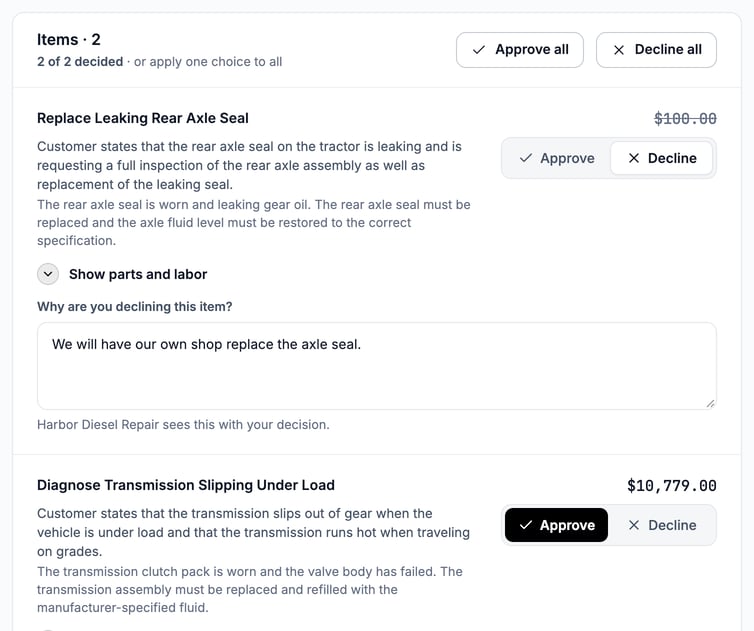
The customer declines one item with a reason and approves the other.
The customer types their name and email, then clicks Send my decision. After that, the portal lists the approved and declined items, with the reason under each declined one. It also tells the customer that a declined item shows on the invoice as declined and isn't billed.
The technician sees the declined item as Customer declined and works on the approved items.
See the declined line on the invoice
Open the service order and click the Invoice tab. Under Work Items, the declined item is shown for the record:
- A red DECLINED badge.
- The item name, struck through.
- Reason: and the customer's own words.
- $0.00 (not charged) on the right.
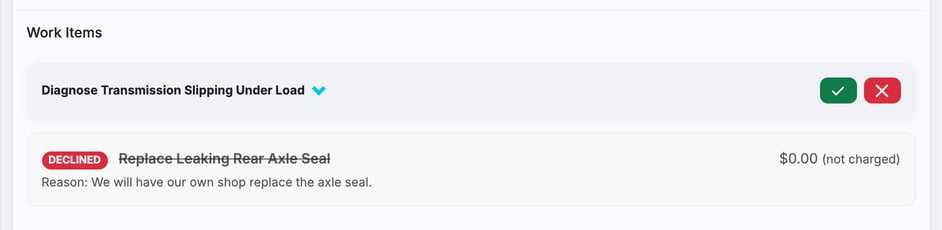
The declined line sits next to the approved work, billed at nothing.
Check the total
Scroll to Invoice Summary. Subtotal (labor & parts) adds up the approved items only. Shop supplies and taxes are worked out from the approved items' parts and labor, so a declined item never adds to them. When a job is declined, the order's labor is rounded up once to your shop's rounding step, and the approved jobs share that total. See Choose How Labor Is Rounded.
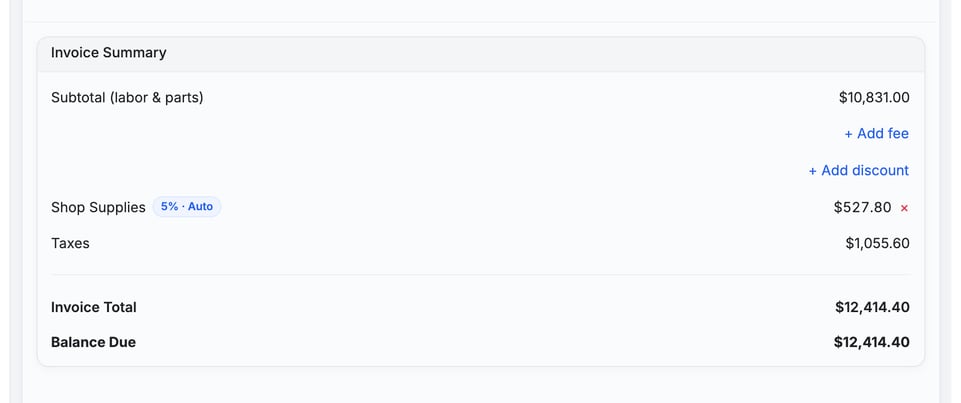
Declined work is never billed. The $0.00 line is there so the invoice is clear about what was and wasn't done. The customer is charged only for the approved items.
Why it works this way
- Transparency: the shop sees which items the customer declined next to the approved work.
- A record with reasons: the decline reason travels onto the invoice.
- No accidental charges: declined lines can't slip into the total.
Troubleshooting
| Symptom | Likely cause | Fix |
|---|---|---|
| I don't see a declined line on the invoice | Nothing was declined, or the estimate auto-approved because it was at or below the threshold | Declined lines appear only if the customer chose Decline on at least one item and sent the decision. |
| A line is on the invoice with a price | The customer approved it, or it was never declined | Check the customer's decision on the estimate. Only items set to Decline drop to $0.00. |
| The customer wants the declined work after all | They changed their mind | Add the work as a new item on the order's Estimate tab and send it for approval again. See Build and Send an Estimate on a Service Order. |
| The customer never got the estimate to decide on | No contact on the order can receive it | Under Members & Contacts, add a contact who has an email address and a role that is allowed to approve estimates. |
FAQs
Does the customer pay for declined lines?
No. They show at $0.00 and are left out of the total, the shop supplies and the taxes.
Why show them at all?
So the invoice is clear about what was declined and why.
Can I remove a declined line from the invoice?
No. It stays for the record. If the customer wants the work later, add it as a new item and send it for approval again.
Does the customer see the reason they gave?
Yes. The customer sees the reason under the declined item on their decision summary. The shop sees it on the declined line on the Invoice tab.