
For: Owners and managers · Permission: Manage account settings (plus Read rates or Manage rates to open the tab) · Time: ~2 minutes
Quick summary
- Open Settings › Pricing & Rates › Labor Rates.
- Find the Labor rounding card and click Edit.
- Pick a step under Round labor up to: 1, 5, 15 or 30 minutes.
- Read the example, then click Save.
Before you start
- To see the card you need a role that can open the Labor Rates tab (Read rates or Manage rates). To change the step you also need Manage account settings. Without it the card has no Edit link.
- The default step is 15 minutes.
- The setting applies to orders not yet invoiced. Invoices already sent keep their hours.
Read your current step
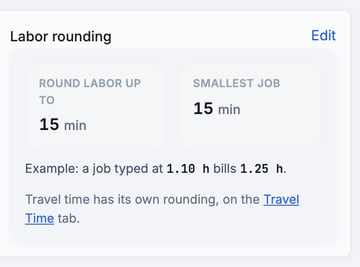
Click Settings, then Pricing & Rates. Open the Labor Rates tab. The Labor rounding card shows:
- Round labor up to: your step.
- Smallest job: the least time a job with labor bills. It is the larger of 15 minutes and one step.
- An example, such as "a job typed at 1.10 h bills 1.25 h" at the 15-minute step.
Change the step
- On the Labor rounding card, click Edit.
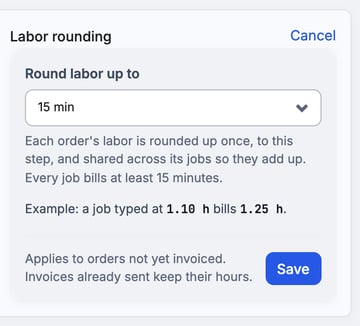
- Open Round labor up to and pick 1 min, 5 min, 15 min (the default) or 30 min.
- Check the example under the field. It changes with your choice.
- Click Save. To leave without changing anything, click Cancel.
Travel time is separate. If your role can open the Travel Time tab, travel has its own rounding there. See Set Up Travel Time Billing.
How billing uses the step
- The order's labor is rounded up once to the step, then shared across its jobs so the jobs add up to that total.
- Each job with hours bills at least the smallest job. A job with 0 h stays at 0 h.
- Staff see billed hours on the order's Invoice tab, with "typed x.xx" beside them when they differ.
- When you add labor, a hint under Hours reads like "This job bills 1.25 h. The order's 3.36 h of labor is rounded up once, to 3.50 h, and shared across its jobs."
- If a job is declined, the kept labor is rounded again, and the approval page says what declining saves.
- Preventive maintenance and inspection visit invoices round their labor once per invoice.
Example at 15 minutes: three jobs of 67 minutes at $120/h. Typed as 1.12 h each, they total 3.36 h, rounded up once to 3.50 h. The jobs bill 1.00 h, 1.25 h and 1.25 h, which is $420.00.
Troubleshooting
| Symptom | Likely cause | Fix |
|---|---|---|
| There is no Edit link on the card | Your role doesn't have Manage account settings | Ask an owner or admin to change the step. |
| There is no Labor Rates tab | Your role has no rates permission | Ask an owner or admin for Read rates or Manage rates. |
| A "Labor rounding wasn't saved" window appears | Your Manage account settings permission was removed while the card was open | The window says the step is unchanged. Ask someone who manages account settings to change it. |
| A sent invoice kept its old hours | Sent invoices keep their hours | No action needed. The new step applies to orders not yet invoiced. |
FAQs
What is the smallest job?
The larger of 15 minutes and one step. At the 30-minute step, the smallest job is 30 minutes.
Does this change travel time?
No. Travel time has its own setting on the Travel Time tab.
What do customers see?
Only the billed hours.