---
title: Auto-Approval Threshold
description: Set a per-customer dollar threshold so estimates at or below it skip customer approval.
---
[Skip to content](https://support.metafleet.ai/auto-approval-threshold#main-content)
English
Show submenu for translations

Open main navigation
Close main navigation
- English
Show submenu for translations
- [Contact us](mailto:support@metafleet.ai)
[Contact us](mailto:support@metafleet.ai)
How can we help you?
- There are no suggestions because the search field is empty.
1. [MetaFleet Answer Hub](https://support.metafleet.ai/?hsLang=en)
2. [Estimates & Approvals](https://support.metafleet.ai/estimates-approvals?hsLang=en)
3. [Approval Gates](https://support.metafleet.ai/estimates-approvals?hsLang=en#approval-gates)
# Auto-Approval Threshold
## Set a per-customer dollar limit so estimates at or under it approve automatically.
**For:** Owners and managers · **Permission:** Manage bypass threshold · **Time:** ~2 minutes
### Quick summary
1. Open the customer under **Company Details › Companies**.
2. On the **Auto-Approval Threshold** card, click **Add auto-approval threshold** (or **Edit**).
3. Enter the dollar amount and click **Save**.
### How it works
The threshold is a dollar amount set **per customer**. When an estimate is submitted for approval:
- At or **under** the threshold, it **auto-approves**. The customer isn't asked and isn't emailed, and work can start.
- **Over** the threshold, it's **sent to the customer** for approval as usual.
- With no threshold set for the customer, the partner's or shop's limit applies if there is one. If none applies, every estimate is sent to the customer.
The amount compared is the estimate total: labor, parts, fees (including the Service Fee and travel), and tax, less any discount. If a fee changes the total, the limit is checked again.
> **It rides on the customer gate.** The threshold only does anything when **Customer approval is required before work can begin** is on. With that gate off, no estimate goes to customers at all, so the threshold has nothing to bypass. The card shows **(paused)**.
### Before you start
- The **Customer approval is required before work can begin** gate is on. See [Configure Approval Options](https://support.metafleet.ai/configure-approval-options?hsLang=en).
- Your role includes the **Manage bypass threshold** permission. Without it, the card is hidden.
- The threshold lives on the **customer's company page**, not in Settings.
### Open the customer's company page
Go to **Company Details › Companies** and click the customer. Scroll to the **Auto-Approval Threshold** card.
### Enter a dollar amount
Click **Add auto-approval threshold**. If a threshold already exists, click **Edit** instead. Type the limit and click **Save**. Click **Cancel** to leave without changing it.
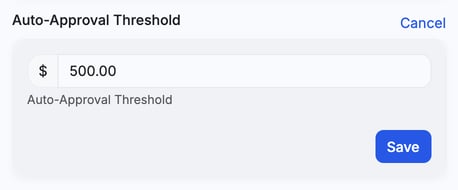
*Editing the limit for this customer.*
### Confirm it's set
The card now reads **Auto-approval threshold set to $500.00**. Estimates for this customer at or under that amount auto-approve.
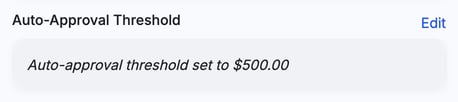
*Set. From now on, estimates up to $500.00 for this customer skip the approval step.*
> **Editing an estimate up past the limit sends it back for approval.** If an estimate auto-approved under the threshold and later edits push the total over it, MetaFleet reverts it to needing customer approval. It adds a note to the service order's history. This keeps a small auto-approved job from growing past the limit unseen. Once the job is in repair, the status is left alone.
You can also set the threshold when you create a company, under **Advanced options** in the new customer window, in the **Auto-approval threshold** field. The field only shows if you have the threshold permission.
### Check it before you send an estimate
On the order's **Estimate** tab, a note above **Send Estimate to Customer** tells you what will happen. See [Build and Send an Estimate](https://support.metafleet.ai/build-and-send-an-estimate?hsLang=en).
- A green note names the limit in force and says the total is at or below it, so the estimate auto-approves. That limit is the partner's if the order has one, else the customer's, else the shop default.
- A yellow note says there's no limit, or the total is over the one in force, so the estimate is sent for customer approval.
- A blue note says customer approval is off for the whole account, so the estimate auto-approves on submit and the customer isn't notified.
After the estimate auto-approves, a green banner on the card reads **Auto-approved. Estimate total $X is at or below the $Y auto-approval threshold. Customer was not notified — proceed to repair.** On older orders with no record of how approval was given, it reads **Auto-approved. Go ahead with the repair.** If someone skipped approval on purpose, it reads **Approval was skipped**.
Under the limit, MetaFleet doesn't ask the customer. To ask anyway, click **Send for approval** on the Estimate tab. See [Send an Estimate for Approval When It's Under the Threshold](https://support.metafleet.ai/send-an-estimate-for-approval-under-the-threshold?hsLang=en).
> **A partner's own limit wins.** If an order from a partner carries its own approval threshold, that limit is used instead of the customer's.
> **Other approvals still apply.** The threshold only answers the customer question. If **Require Manager Approval for Estimates** is on, a manager still reviews the estimate first. If **Estimates require Dispatcher approval before sending to Customer** is on, a dispatcher still checks the estimate and sends it on before anything else happens. See [Understanding the Approval Gates](https://support.metafleet.ai/understanding-the-approval-gates?hsLang=en).
### Troubleshooting
| Symptom | Likely cause | Fix |
| --- | --- | --- |
| The card says "(paused)" and **Edit** is greyed out | The customer approval gate is off. The card calls it "Customer approval required for estimates"; it's the same setting | Click **Turn on customer approval →** on the card and confirm. It's a shop-wide setting and turns on only that one gate. If the card says to ask an account admin, ask them to turn the gate on in Workflow Settings. |
| A small estimate still went to the customer | No threshold is set for that customer, or the total was over it | Set or raise the threshold on that customer's company page. |
| A big estimate auto-approved unexpectedly | The threshold is higher than that job, or the order has a partner limit or shop default that is higher | Check the green note on the Estimate tab to see which limit was used. Lower the threshold to the amount you're comfortable bypassing. |
| An auto-approved estimate needs approval again | Edits pushed the total over the customer's threshold | This is expected. Send it to the customer, or trim the estimate back under the limit. The service order's history has a note explaining the change. |
| I can't see the card | Your role doesn't include the **Manage bypass threshold** permission | Ask an account admin to add it, or to set the threshold for you. |
### FAQs
**Is the threshold global or per customer?**
Per customer. Set it on each company's page, so you can be more lenient with trusted accounts.
**What about an estimate exactly at the threshold?**
It auto-approves. At or under the limit is bypassed.
**Does it skip manager approval too?**
No. The threshold answers the customer question. If you require manager approval for estimates, that step still applies.
**Can I remove a threshold later?**
Yes. Edit the customer's card and clear the amount. Estimates go back to needing customer approval.
**What if I edit an auto-approved estimate up past the limit?**
It goes back to needing customer approval, with a note in the service order's history. Trimming the estimate back under the limit leaves the auto-approval in place. Once the job is in repair, the status is left as is.
### Related articles
- [Configure Approval Options](https://support.metafleet.ai/configure-approval-options?hsLang=en)
- [Understanding the Approval Gates](https://support.metafleet.ai/understanding-the-approval-gates?hsLang=en)
- [Approve or Decline an Estimate](https://support.metafleet.ai/approve-or-decline-an-estimate?hsLang=en)
- [Build and Send an Estimate](https://support.metafleet.ai/build-and-send-an-estimate?hsLang=en)
- [Start Here](https://support.metafleet.ai/start-here?hsLang=en)
- [Companies & Contacts](https://support.metafleet.ai/companies-contacts?hsLang=en#main-content)
- [Create/Edit Companies](https://support.metafleet.ai/companies-contacts?hsLang=en#create-edit-companies)
- [Contacts](https://support.metafleet.ai/companies-contacts?hsLang=en#contacts)
- [Vehicles](https://support.metafleet.ai/companies-contacts?hsLang=en#vehicles)
- [Work Intake (Requests & Service Orders)](https://support.metafleet.ai/work-intake-requests-service-orders?hsLang=en#main-content)
- [Creating Service Orders](https://support.metafleet.ai/work-intake-requests-service-orders?hsLang=en#creating-service-orders)
- [Customer & Partner Requests](https://support.metafleet.ai/work-intake-requests-service-orders?hsLang=en#customer-partner-requests)
- [Reference](https://support.metafleet.ai/work-intake-requests-service-orders?hsLang=en#reference)
- [Customer Portal](https://support.metafleet.ai/work-intake-requests-service-orders?hsLang=en#customer-portal)
- [Estimates & Approvals](https://support.metafleet.ai/estimates-approvals?hsLang=en#main-content)
- [Approval Gates](https://support.metafleet.ai/estimates-approvals?hsLang=en#approval-gates)
- [Estimates](https://support.metafleet.ai/estimates-approvals?hsLang=en#estimates)
- [Invoices](https://support.metafleet.ai/estimates-approvals?hsLang=en#invoices)
- [Billing](https://support.metafleet.ai/estimates-approvals?hsLang=en#billing)
- [Parts, Inventory & Vendors](https://support.metafleet.ai/parts-inventory-vendors?hsLang=en#main-content)
- [Add Parts & Kits](https://support.metafleet.ai/parts-inventory-vendors?hsLang=en#add-parts-kits)
- [Stock & Counts](https://support.metafleet.ai/parts-inventory-vendors?hsLang=en#stock-counts)
- [Locations & Bins](https://support.metafleet.ai/parts-inventory-vendors?hsLang=en#locations-bins)
- [Purchase Orders](https://support.metafleet.ai/parts-inventory-vendors?hsLang=en#purchase-orders)
- [Parts Catalog](https://support.metafleet.ai/parts-inventory-vendors?hsLang=en#parts-catalog)
- [Vendors & Manufacturers](https://support.metafleet.ai/parts-inventory-vendors?hsLang=en#vendors-manufacturers)
- [Pricing](https://support.metafleet.ai/parts-inventory-vendors?hsLang=en#pricing)
- [Service Vehicles](https://support.metafleet.ai/parts-inventory-vendors?hsLang=en#service-vehicles)
- [Sourcing & Hand-Off](https://support.metafleet.ai/parts-inventory-vendors?hsLang=en#sourcing-hand-off)
- [Part Numbers](https://support.metafleet.ai/parts-inventory-vendors?hsLang=en#part-numbers)
- [Notifications](https://support.metafleet.ai/parts-inventory-vendors?hsLang=en#notifications)
- [Reports](https://support.metafleet.ai/parts-inventory-vendors?hsLang=en#reports)
- [Invoicing & Payments](https://support.metafleet.ai/invoicing-payments?hsLang=en)
- [Dispatch & Scheduling](https://support.metafleet.ai/dispatch-scheduling?hsLang=en#main-content)
- [Preventative Maintenance](https://support.metafleet.ai/dispatch-scheduling?hsLang=en#preventative-maintenance)
- [Technician Assignment](https://support.metafleet.ai/dispatch-scheduling?hsLang=en#technician-assignment)
- [Scheduling & Calendar](https://support.metafleet.ai/dispatch-scheduling?hsLang=en#scheduling-calendar)
- [Technician Schedule](https://support.metafleet.ai/dispatch-scheduling?hsLang=en#technician-schedule)
- [Technicians & Mobile App](https://support.metafleet.ai/technicians-mobile-app?hsLang=en#main-content)
- [Time Tracking](https://support.metafleet.ai/technicians-mobile-app?hsLang=en#time-tracking)
- [Tech Workflow](https://support.metafleet.ai/technicians-mobile-app?hsLang=en#tech-workflow)
- [Evidence & Photos](https://support.metafleet.ai/technicians-mobile-app?hsLang=en#evidence-photos)
- [AI Assistant](https://support.metafleet.ai/technicians-mobile-app?hsLang=en#ai-assistant)
- [Alerts, Alarms & Notifications](https://support.metafleet.ai/alerts-alarms-notifications?hsLang=en#main-content)
- [Email/SMS/App Settings](https://support.metafleet.ai/alerts-alarms-notifications?hsLang=en#email-sms-app-settings)
- [Reporting & Dashboards](https://support.metafleet.ai/reporting-dashboards?hsLang=en)
- [Admin & Settings](https://support.metafleet.ai/admin-settings?hsLang=en#main-content)
- [Rates & Fees](https://support.metafleet.ai/admin-settings?hsLang=en#rates-fees)
- [Branding](https://support.metafleet.ai/admin-settings?hsLang=en#branding)
- [Roles, Permissions & Users](https://support.metafleet.ai/admin-settings?hsLang=en#roles-permissions-users)
- [Service Areas](https://support.metafleet.ai/admin-settings?hsLang=en#service-areas)
- [Workflows](https://support.metafleet.ai/admin-settings?hsLang=en#workflows)
- [Taxes](https://support.metafleet.ai/admin-settings?hsLang=en#taxes)
- [Integrations](https://support.metafleet.ai/admin-settings?hsLang=en#integrations)
- [Integrations](https://support.metafleet.ai/integrations?hsLang=en#main-content)
- [Phone Setup](https://support.metafleet.ai/integrations?hsLang=en#phone-setup)
- [AI Assistant Access](https://support.metafleet.ai/integrations?hsLang=en#ai-assistant-access)
- [QuickBooks](https://support.metafleet.ai/integrations?hsLang=en#quickbooks)
- [Getting Around](https://support.metafleet.ai/getting-around?hsLang=en#main-content)
- [Search & Command Bar](https://support.metafleet.ai/getting-around?hsLang=en#search-command-bar)
[](http://www.metafleet.ai)
[mailto:support@metafleet.ai](mailto:support@metafleet.ai)
Copyright © 2025, MetaFleet, Inc