
MetaFleet gives you five approval checkpoints you can switch on or off. Together they decide where a job pauses for a sign-off — and who gives it.
For: Owners & Managers · Type: How it works · Time: 5-minute read
Who this is for
Owners, managers, and dispatchers who want to understand how a job moves from diagnosis to a paid invoice — and exactly where it stops for approval along the way.
What you'll learn
What each of the five gates does, who approves at each one, how they combine across the service-order lifecycle, and how the customer auto-approval threshold fits in.
The short version
The five gates
Each gate inserts one sign-off into the job's path. Here's who approves and where the job waits when the gate is on:
| Gate | Who signs off | The job waits at… |
|---|---|---|
| Dispatcher approval is required before work can begin | Dispatcher | Diagnosis Complete |
| Require Manager Approval for Estimates | Manager | Estimate — manager review |
| Customer approval is required before work can begin | Customer | Estimate — customer review |
| Dispatcher approval is required before work can be completed | Dispatcher | In Review |
| Require Manager Approval for Invoices | Manager | Invoice — manager review |
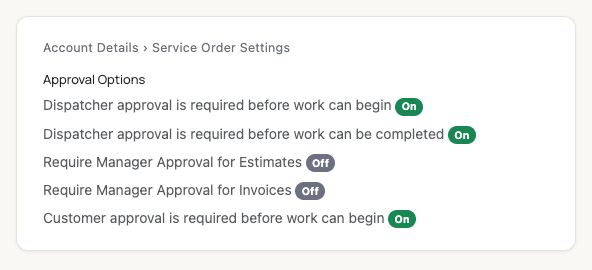
The five gates, each an on/off switch, under Account Details → Service Order Settings.
How they combine across the job
The gates sit at three natural pauses in the lifecycle. Walk a job from diagnosis to payment and you pass each one in turn.
Checkpoint 1 — before repairs start
When the tech finishes diagnosis, the job pauses at Diagnosis Complete if any of these are on:
Checkpoint 2 — before invoicing
After the tech submits the completed repairs, if Dispatcher approval is required before work can be completed is on, the job waits at In Review until the dispatcher approves. Then it moves to invoicing. If it's off, it goes straight to Repair Complete.
Checkpoint 3 — before the invoice is sent
When the invoice is built, if Require Manager Approval for Invoices is on, it waits at Invoice — manager review until a manager approves. Then it's sent for payment. If it's off, it goes straight to Pending Payment.
The customer auto-approval threshold
The customer gate has one extra dial. Each customer can have a dollar threshold: an estimate at or below it auto-approves without asking the customer, even when the customer gate is on. Anything above it is sent for approval as usual.
Master switch. If Customer approval is off entirely, no estimate ever goes to a customer — thresholds have no effect. Turning the customer gate on also turns on Dispatcher approval before work can begin automatically (a dispatcher always vets the work before a customer sees it).
A couple of worked examples
- All gates off: Diagnosis → repairs → invoice → payment, no pauses. Fastest path; best for a small owner-operator shop.
- Customer + invoice gates on: Job pauses for the customer to approve the estimate, runs the repair, then pauses again for a manager to approve the invoice before it's sent.
- Manager-estimate + dispatcher-repairs on: A manager vets every estimate before it leaves the shop, and a dispatcher signs off completed work before it's invoiced — customer never sees an approval step.
Troubleshooting
| Symptom | Likely cause | Fix |
|---|---|---|
| Jobs stall at "Diagnosis Complete" | A before-repairs gate is waiting on a sign-off | Approve the work items / estimate, or turn the gate off if you don't need it. |
| Customers never get the estimate | The customer gate is off, or the estimate is under the threshold | Turn on Customer approval and check the customer's threshold. |
| Invoices sit unsent at "Invoice — manager review" | The invoice gate is on | Have a manager approve the invoice, or turn the gate off. |
| I can't turn off "Dispatcher approval before work begins" | The customer gate is on, which forces it on | Turn off Customer approval first if you truly want it off. |
FAQs
Do the gates have to be used together?
No — each is independent. Turn on only the checkpoints your shop needs.
What's the difference between the two dispatcher gates?
One holds the job before repairs begin (approve the work); the other holds it before invoicing (approve the completed work).
Can a big estimate skip customer approval?
Only if it's at or below that customer's auto-approval threshold, or the customer gate is off.
Where do I change these?
Account Details → Service Order Settings → Edit. See Configure Approval Options.