
For: Dispatchers and managers · Permission: the one that lets you cancel a service order · Time: ~2 minutes
Quick summary
- Open the order and find Stop work & invoice (on a tow, End work & invoice at the top of the order).
- Pick why the work is stopping.
- Tick the parts the technician fitted.
- Click Stop work & invoice, then review and send the invoice.
Before you start
- Use this when the customer calls the job off at the door, the vehicle can't be fixed, or you need to stop and bill what was done.
- You need the same permission that lets you cancel a service order. On a repair or tow order the button doesn't show without it. On a visit the button shows, but the stop is refused with "You do not have permission to stop work on this service order."
- Make the call with the customer first. The technician is released as soon as you confirm.
- There is no way back. A stopped order can't return to in progress.
Find the button
The button shows only while there is still work to stop. Where you look depends on the order type:
- Repair order: the Invoice tab. Once the technician has submitted all repairs, the button is replaced by End Work & Review.
- Tow: the top of the order, to the right of the title, next to Cancel Service Order. It shows on every tab until the tow is delivered and reads End work & invoice.
- PM or inspection visit: the visit page, on the invoice row next to Preview. It shows once the technician is on the way and the visit has a service order. It goes away when the order reaches invoicing or the visit invoice has been sent.


Say why the work is stopping
Click the button. A window opens.
- Pick a reason. Customer cancelled is preselected. The others are Vehicle is not on-site, Site inaccessible, Area is not covered and Other.
- Add a note if it helps. The note is required for Other.
The reason and note are internal. They go on the order's timeline and in reports. They don't appear on the invoice or in customer emails.
Tell MetaFleet which parts were used
If the order has part lines, the window asks Which parts were used? Nothing is ticked at first.
- Tick each part the technician fitted. The Used box fills with the full quantity.
- Lower the quantity if only some were fitted. It can't be more than the quantity on the order.
- Check the line under the list. It reads, for example, "1 part used. Everything else goes back to stock."
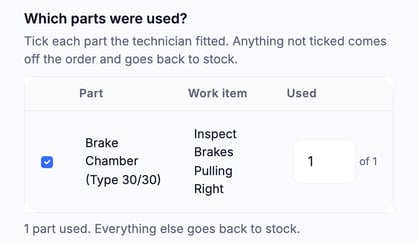
Anything you don't tick comes off the order and goes back to stock. It isn't billed. If you skip every part, all of them go back.
A part line can show a note under its work item, such as "Estimate not sent · not on the invoice". That part wasn't going to be billed.
If the order has no part lines, the question doesn't show. A tow usually has none.
Confirm the stop
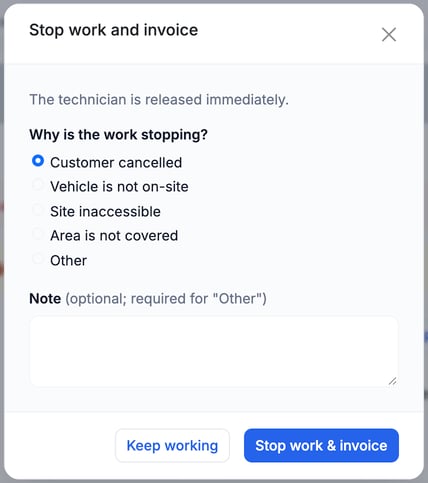
- Click Stop work & invoice (on a tow, End work & invoice).
- Fix anything the window flags. "Enter how many were used, or untick it." means a ticked part has no quantity.
To back out, click Keep working (on a tow, Keep the tow running). Nothing changes.
What happens next
- The technician's work stops and the job closes on their device.
- The order reads Work Stopped until it is invoiced, not Repair Complete. On the Repair Board, the last step reads Work Stopped too.
- The order moves straight to invoicing. It skips diagnosis, estimate and repair approvals.
- Everything recorded so far stays on the invoice for you to review: labor, work items, the call-out charge and fees. Parts you didn't tick are gone.
- Work items that never reached approval don't block Send Invoice.
- On a visit, any truck already finished is still billed. Trucks not finished are canceled.
- The customer gets nothing at the moment of the stop. They hear about it when you send the invoice. The email is titled Work Stopped: Invoice For Call-Out, says the repairs were not completed, and gives your phone number for a new visit.
Open the Invoice tab, trim lines if you need to, then send. See Approve and Send an Invoice.
Stop work and invoice or Cancel Service Order?
| Stop work & invoice | Cancel Service Order | |
|---|---|---|
| Technician | Released | Released |
| Invoice | Yes, from what was recorded | None. Nothing is billed |
| Order ends as | Invoicing, then paid | Canceled |
| Use it when | You want to bill the trip or the work done | The job should never be billed |
See Manage a Service Order for canceling.
Troubleshooting
| Symptom | Likely cause | Fix |
|---|---|---|
| I don't see the button | You don't have the permission that lets you cancel a service order | Ask an admin to add it to your role. |
| Confirm says "You do not have permission to stop work on this service order." | Visit pages show the button to everyone, but the stop needs the cancel permission | Ask an admin to add it to your role. |
| I see End Work & Review, not Stop work & invoice | The technician already submitted all repairs | Use End Work & Review to finish the job the usual way. |
| The button is gone on a visit | The visit has no service order yet, it already reached invoicing, or the visit invoice has been sent | Go on to the invoice. Stopping isn't needed. |
| Confirm says the order already reached invoicing, was invoiced or is closed | The technician finished, or someone else moved the order, while your page was open | Reload. Use End Work & Review or Send Invoice instead. |
| The window won't close on confirm | The reason is Other with no note, or a ticked part has no quantity | Add the note or the quantity, or untick the part. |
| A part I didn't use is still on the invoice | It was ticked in the window | Stopping can't be undone. Remove the line on the Invoice tab before you send. |
FAQs
Can the technician stop the job?
No. Only a dispatcher or manager with the cancel permission can stop it.
Will I still get the call-out charge?
Yes. The order is invoiced, so the call-out charge and fees on it stay as recorded.
Do I have to answer the parts question?
Yes, if it shows. Nothing is ticked at first, so answering "none" means every part goes back to stock.
Can I undo it?
No. Stopped orders don't go back to in progress.