
For: Owners, managers and accountants · Permission: Manage account settings to change a location's account · Time: 6-minute read
QuickBooks keeps one quantity for each part. MetaFleet keeps a quantity for each part in each location. So MetaFleet does not copy stock levels across. It sends two things instead: the stock changes that no bill or invoice already covers, and the value of the stock in each location. (MetaFleet also sets a part's opening count once, when it creates the item in QuickBooks.)
Both go at night, at 11:00 PM in your shop's time zone, not when you make the change. For the timing of everything else, see How MetaFleet and QuickBooks Work Together.
What goes to QuickBooks and what doesn't
| In MetaFleet | In QuickBooks | Direction | When it syncs | Where you set it |
|---|---|---|---|---|
| Adjust Stock and cycle counts | Inventory adjustment, posted to the Stock adjustments account | MetaFleet to QuickBooks | Nightly | Posting accounts |
| Stock received with no purchase order | Inventory adjustment, posted to the Stock adjustments account | MetaFleet to QuickBooks | Nightly | Posting accounts |
| Stock issued for shop use (not on a service order) | Inventory adjustment, posted to the Parts used in the shop account | MetaFleet to QuickBooks | Nightly | Posting accounts |
| Value of the stock in a location | Journal entry between the location's asset account and your default inventory asset account (the Parts on the shelf row in Posting accounts) | MetaFleet to QuickBooks | Nightly | Inventory Locations page, Asset account column |
| Stock received on a purchase order with a bill or expense | The bill or expense adds the stock | MetaFleet to QuickBooks | With the bill | Purchase order |
| Parts used on a service order | The invoice takes the stock | MetaFleet to QuickBooks | With the invoice | Invoice |
| Transfer between locations with different asset accounts | Part of the nightly journal entry | MetaFleet to QuickBooks | Nightly | Inventory Locations page, Asset account column |
| Transfers between locations on one account, reservations and handoffs | Nothing | Not sent | Never | Not applicable |
Stock changes: the nightly inventory adjustment
Each night MetaFleet adds up the day's changes for each part and sends them to QuickBooks as one inventory adjustment per account: one for Stock adjustments, one for Parts used in the shop. QuickBooks values each line at the item's cost in QuickBooks.
- Stock adjustments carries adjustments, cycle counts and stock received without a purchase order.
- Parts used in the shop carries stock issued for shop use, meaning an issue that is not tied to a service order.
Each adjustment appears in QuickBooks with a number that starts with MF-, dated in your shop's time zone. Its memo reads "MetaFleet stock movements with no bill or invoice". If a night's changes add up to zero for a part, that part is left out. If they add up to zero for the whole night, nothing is sent.
Why some changes never go. A bill or an invoice already moves the stock in QuickBooks. Stock received on a purchase order is covered by its bill or expense. Parts issued to a service order are covered by that order's invoice. Sending them again would count them twice.
Inventory value by location
You can give a location its own asset account in QuickBooks. Then that account holds the full value of that location's stock, and your default inventory asset account holds the rest. The default is the account on your Parts on the shelf row in Posting accounts; this article calls it the default account.
- Open the Inventory Locations page and find the Asset account column.
- A location with no account of its own reads Default followed by your default inventory asset account.
- Pick an account from the list to give the location its own. It must be an inventory-type asset account in QuickBooks. If you see the account as text instead of a list, you don't have the permission to change it.
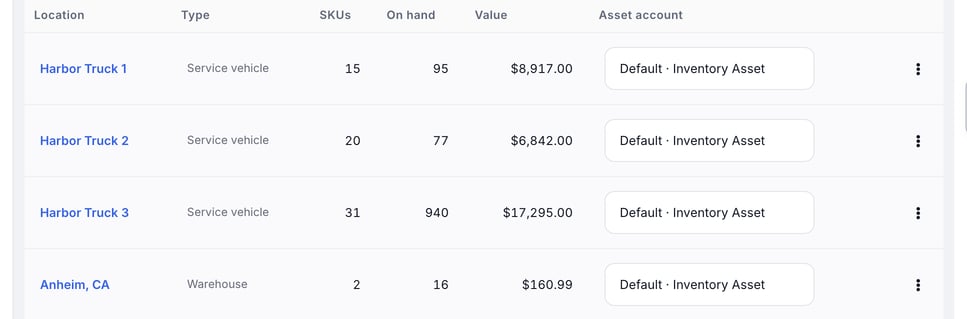
Each night MetaFleet sends the change in value as one journal entry in QuickBooks, between the location's account and the default account. Moving stock between two locations that share an account sends nothing. Moving it between two locations with different accounts shows up in the next night's journal entry. The journal entry's memo reads "MetaFleet inventory value by location".
The value is on hand times MetaFleet's part cost, so it can differ from what QuickBooks works out for the same stock.
If QuickBooks later makes a location's account inactive, the column shows Inactive in QuickBooks. Choose another account for that location.
Check what went to QuickBooks
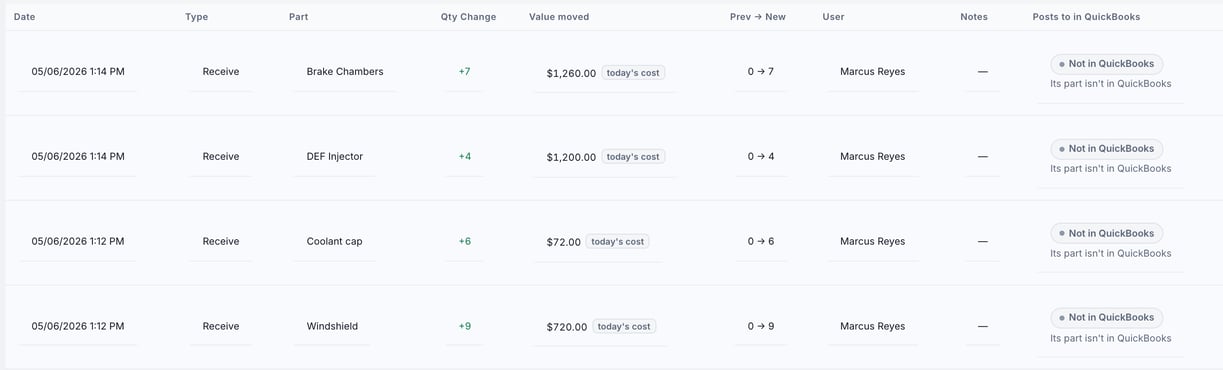
Open the location on the Inventory Locations page and go to its History tab. Two columns tell the story:
- Value moved shows the dollar value of each movement. You see it only if you have the permission to view cost. A tag reading "today's cost" means the movement happened before MetaFleet recorded its cost, so today's cost is used.
- Posts to in QuickBooks shows where each movement went.
| What the cell says | What it means |
|---|---|
| Stock adjustment or Nightly journal entry, with Goes tonight under it | The change is queued for tonight. |
| Stock adjustment, with a number and a date | The change was sent in that adjustment. |
| Nightly journal entry, with a date | The value move for a transfer between locations with different accounts was sent. |
| With invoice, or Bill or Expense, with a number | That QuickBooks document moved the stock. No adjustment is needed. |
| Waiting for an account | A Posting accounts row or a location account needs an account. Choose one, then the change goes on the next night. |
| Failed | QuickBooks refused it. Retry it from the Activity tab of the QuickBooks card. |
| Posts nothing | The change has no QuickBooks effect, for example a transfer between locations that share an account. |
| Not in QuickBooks | The part isn't an item yet, the posting row had no account when the change happened, or the receipt has no bill yet. |
| With the invoice | The order's invoice hasn't reached QuickBooks yet. It will take the stock when it does. |
| Nothing to send | That night's changes for the part netted to zero. |
| Waiting, Waiting for setup | Parts is off, sales tax is held, or setup isn't finished. Fix it on the QuickBooks tab. |
What must be in place first
- QuickBooks is connected, and Parts is on under what syncs. See Choose What Syncs with QuickBooks.
- Your QuickBooks company tracks inventory quantities. If it doesn't, no stock is sent.
- The part is already an item in QuickBooks. See How Parts, Labor and Fees Map to QuickBooks Items.
- Both Stock adjustments and Parts used in the shop have an account in Posting accounts on the QuickBooks tab under Settings › Integrations. Parts used in the shop follows Stock adjustments until you give it its own account. Ask your accountant which accounts to use. See Choose Where Your Money Posts in QuickBooks.
- For inventory value by location, Parts on the shelf has a working account. If it doesn't, the journal entry waits.
Only changes after setup count. A stock change counts only if it happened after the part became an item in QuickBooks and after the account was chosen. The item's opening stock already covers everything before that.
Your own company only. Stock goes to your shop's own QuickBooks company. A brand that has connected a QuickBooks company of its own does not get stock changes.
Troubleshooting
| Symptom | Likely cause | Fix |
|---|---|---|
| No adjustment appears in QuickBooks after a count | It goes at night, or the part isn't an item in QuickBooks yet | Check the location's History tab. Goes tonight means it is queued. |
| History says Waiting for an account | Stock adjustments or Parts used in the shop has no working account | Choose an account in Posting accounts. The change goes the next night. |
| Nothing is sent and History shows Posts nothing with the reason "QuickBooks doesn't track stock quantities here" | Your QuickBooks company has inventory tracking off | Turn on inventory tracking in QuickBooks. Ask your accountant first. |
| A location shows Inactive in QuickBooks | The location's asset account was made inactive or deleted in QuickBooks | Choose another account in the Asset account column. |
| A transfer between locations shows Posts nothing | Both locations use the same account | No action needed. Value only moves between different accounts. |
| An adjustment shows Failed | QuickBooks refused it | Read the reason on the Activity tab and fix it. Then retry. See Fix What Needs Attention in QuickBooks. |
FAQs
Does MetaFleet send my on-hand quantities to QuickBooks?
Once. When MetaFleet creates the item it sets the opening count. After that QuickBooks gets only the changes that bills and invoices don't already cover, and each location's stock value.
Why do the quantities in QuickBooks and MetaFleet differ?
QuickBooks holds one quantity for each part, across all locations. MetaFleet shows a quantity per location. Also, changes reach QuickBooks overnight.
Does a transfer between locations change anything in QuickBooks?
Not the quantity. If the two locations post to different asset accounts, the value moves in the next nightly journal entry.
Do stock changes on a brand go to the brand's QuickBooks company?
No. Stock goes to your shop's own company only.