
For: Owners & Managers · Permission: Manage account settings · Time: ~2 minutes
Who this is forOwners and managers setting up how much sign-off a job needs before it moves forward. New to the gates? Read Understanding the Approval Gates first.
What you'll learnWhere the approval settings live, how to change each gate, and the one dependency between them to watch for.
Before you start- You'll need: Account-settings access (owner/manager).
- Heads up: Changes apply to new work. Jobs already mid-flow keep the rules they started under.
Quick summary
- Open Account Details → Service Order Settings.
- Click Edit.
- Tick or untick each gate under Service Order Options.
- Click Save.
Open the Service Order Settings card.
Go to Account Details (the gear / Platform Settings area) and find the Service Order Settings card.
Click Edit.
The card switches to a form with a checkbox for each option.
Set your gates.
Under Service Order Options, tick the approvals you want and clear the ones you don't.
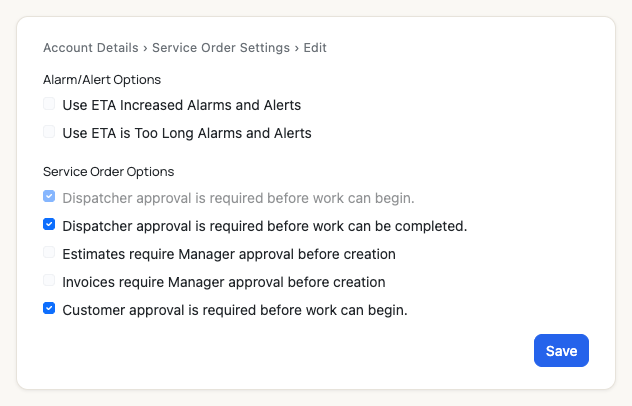
Each gate is a checkbox. Note the greyed one — see the dependency below.
Save.
Click Save. The card returns to its summary view with an On/Off badge for each gate.
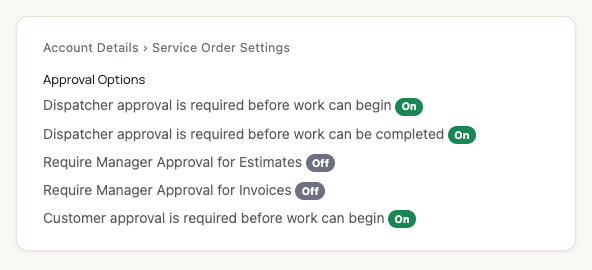
The saved view — a quick On/Off read of every gate.
One dependency to know. Turning on Customer approval is required before work can begin automatically turns on Dispatcher approval is required before work can begin (and locks it on) — a dispatcher always vets the work before a customer is asked. Turn off Customer approval first if you need that dispatcher gate off.What each option does
| Option | Effect when on |
|---|---|
| Dispatcher approval … before work can begin | A dispatcher approves the diagnosed work before repairs start. |
| Dispatcher approval … before work can be completed | A dispatcher signs off the finished repairs before invoicing. |
| Require Manager Approval for Estimates | A manager reviews the estimate before it goes to the customer. |
| Require Manager Approval for Invoices | A manager approves the invoice before it's sent for payment. |
| Customer approval … before work can begin | The customer approves the estimate before repairs start (unless it auto-approves under their threshold). |
The ETA alarm options on the same card are unrelated to approvals — they control dispatch alerts, not job sign-offs.
Per-customer threshold. The amount below which an estimate skips customer approval is set per customer, not here. See Auto-Approval Threshold.Troubleshooting
| Symptom | Likely cause | Fix |
|---|---|---|
| A checkbox is greyed out and won't change | Customer approval is on, locking the dispatcher gate on | Turn off Customer approval first, then the dispatcher gate unlocks. |
| My change didn't take effect on a job | That job started before you saved | Settings apply to new work; in-flight jobs keep their original rules. |
| I don't see the Edit button | You lack account-settings permission | Ask an owner/admin to make the change or grant access. |
Do changes apply to jobs already in progress?
No — only to new work. Active jobs follow the rules in place when they started.
Can I turn everything off?
Yes — with all gates off, jobs flow from diagnosis to payment without approval pauses.
Why can't I uncheck the first dispatcher gate?
Customer approval is on, which requires it. Turn off Customer approval to unlock it.