---
title: Understanding the Approval Gates
description: "Learn where each of the five approval gates pauses a job and who signs off: dispatcher, manager or customer."
---
[Skip to content](https://support.metafleet.ai/understanding-the-approval-gates#main-content)
English
Show submenu for translations

Open main navigation
Close main navigation
- English
Show submenu for translations
- [Contact us](mailto:support@metafleet.ai)
[Contact us](mailto:support@metafleet.ai)
How can we help you?
- There are no suggestions because the search field is empty.
1. [MetaFleet Answer Hub](https://support.metafleet.ai/?hsLang=en)
2. [Estimates & Approvals](https://support.metafleet.ai/estimates-approvals?hsLang=en)
3. [Approval Gates](https://support.metafleet.ai/estimates-approvals?hsLang=en#approval-gates)
# Understanding the Approval Gates
## See where each of the five approval gates pauses a job and who has to sign off before it moves on.
**For:** Owners, managers and dispatchers · **Permission:** None (admin to change the gates) · **Time:** 5-minute read
### The five gates
Each gate adds one sign-off to the job's path. Here's who approves and where the job waits when the gate is on:
| Gate | Who signs off | The job waits at… |
| --- | --- | --- |
| Estimates require Dispatcher approval before sending to Customer | Dispatcher | Diagnosis Complete, before the estimate goes anywhere |
| Require Manager Approval for Estimates | Manager | Estimate Needs Manager Review |
| Customer approval is required before work can begin | Customer | Estimate Needs Customer Approval |
| Dispatcher approval is required before work can be completed | Dispatcher | In Review |
| Require Manager Approval for Invoices | Manager | Invoice Review |
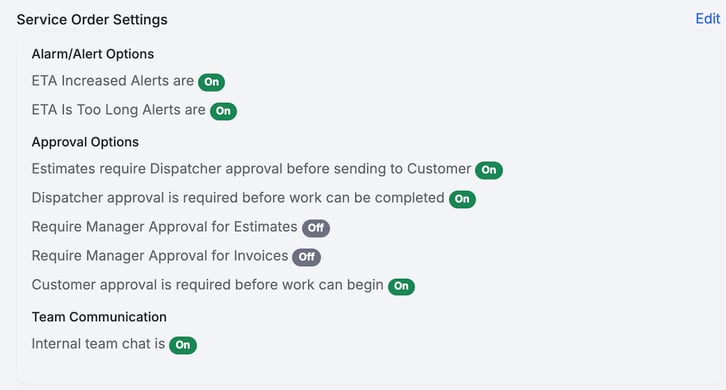
*Each gate is an on/off switch on the Service Order Settings card, under Settings › Workflow › Approvals & Alerts. After you click **Edit**, the two manager gates read **Estimates require Manager approval before creation** and **Invoices require Manager approval before creation**.*
### How they combine across the job
The gates sit at three natural pauses in the job. Walk a job from diagnosis to payment and you pass each one in turn.
### Checkpoint 1: before repairs start
When the technician finishes diagnosis, the job pauses at **Diagnosis Complete** if any of these are on. They come up in this order:
- **Estimates require Dispatcher approval before sending to Customer:** the job waits for a dispatcher first. The dispatcher checks the estimate and sends it on from the Estimate card: to a manager, to the customer, or straight to the technician when nobody else has to approve.
- **Require Manager Approval for Estimates:** a manager reviews every estimate before it goes to the customer, whatever the amount. A quote made before any service order exists skips the manager and goes straight to the customer. When a customer declines and you click **Resubmit**, the changed job goes back to the manager only if its price went up.
- **Customer approval is required before work can begin:** the customer approves the estimate, unless it's at or below the limit in force.
The last approval starts the work. Nobody has to release the technician after it. Approving work for repair is only possible once the job has reached **Diagnosis Complete**.
### Checkpoint 2: before invoicing
After the technician submits the completed repairs, if **Dispatcher approval is required before work can be completed** is on, the job waits at **In Review** until the dispatcher approves. Then it moves to invoicing. If it's off, it goes straight to **Repair Complete**. If work was stopped early, the job reads **Work Stopped** instead.
### Checkpoint 3: before the invoice is sent
When the invoice is built, if **Require Manager Approval for Invoices** is on, it waits at **Invoice Review** for a manager to approve it. Then it's sent for payment. If it's off, you can send it straight away, and it reads **Pending Payment**.
### The customer auto-approval threshold
The customer gate has one extra dial. An estimate at or below the dollar **threshold** in force **auto-approves** without asking the customer, even when the customer gate is on. Anything above it is sent for approval as usual. A quote made before any service order exists always goes to the customer, whatever the threshold. The limit in force is the partner's limit for the order if there is one, otherwise the customer's threshold, otherwise the shop default. If no limit is set anywhere, every estimate goes to the customer.
The Estimate card tells you what happened. An estimate that went through on its own reads *Auto-approved. Estimate total $X is at or below the $Y auto-approval threshold.* If someone skipped the approval, it reads *Approval was skipped*, with the total and the limit when the total was over it. A customer's answer shows who approved and when.
The total that's compared with the limit is what the customer will be billed: parts, labor, the Service Fee if your shop adds one, and billable travel time.
> **Master switch.** If **Customer approval** is off, no estimate goes to a customer on its own, and thresholds have no effect. A quote made before any service order exists still goes to the customer. You can still send one yourself with **Send for approval** on the Estimate card. **Estimates require Dispatcher approval before sending to Customer** stays a separate switch: it doesn't change when you turn the customer gate on or off.
### Worked examples
- **All gates off:** diagnosis, repairs, invoice, payment, with no pauses. The fastest path, and a good fit for a small owner-operator shop.
- **Customer and invoice gates on:** the job pauses for the customer to approve the estimate, runs the repair, then pauses again for a manager to approve the invoice before it's sent.
- **Manager-estimate and dispatcher-repairs gates on:** a manager checks every estimate before it leaves the shop, and a dispatcher signs off finished work before it's invoiced. The customer never sees an approval step.
### Troubleshooting
| Symptom | Likely cause | Fix |
| --- | --- | --- |
| Jobs stall at "Diagnosis Complete" | A before-repairs gate is waiting on a sign-off | If the dispatcher gate is on, a dispatcher checks the estimate and sends it on from the Estimate card. Otherwise a manager or the customer still has to approve it. Turn a gate off if you don't need it. |
| Customers never get the estimate | The customer gate is off, or the estimate is at or below the limit in force | Turn on Customer approval and check the limit in force, or use **Send for approval** on the Estimate card to send it yourself. |
| An estimate went to the customer even though the parts and labor were under the threshold | The Service Fee or billable travel time pushed the total over it | Check the estimate total, with the fee and travel, against the limit in force. |
| Invoices sit unsent waiting for a manager | The invoice gate is on | Have a manager approve the invoice, or turn the gate off. |
### FAQs
**Do the gates have to be used together?**
No. Each one is independent, and turning one on never turns another on. Turn on only the checkpoints your shop needs.
**What's the difference between the two dispatcher gates?**
One checks the estimate right after diagnosis, before it goes to anyone. The other holds the job before invoicing (approve the completed work).
**Can a big estimate skip customer approval?**
Only if it's at or below the limit in force (the partner's limit for the order, else that customer's threshold, else the shop default), or the customer gate is off, or a dispatcher skips it with **Skip Approval**. The Estimate card and the estimate page then read *Approval was skipped*. You can also send any estimate to the customer yourself with **Send for approval**. See [Send an Estimate for Approval When It's Under the Threshold](https://support.metafleet.ai/send-an-estimate-for-approval-under-the-threshold?hsLang=en).
**Where do I change these?**
**Settings › Workflow › Approvals & Alerts**, on the **Service Order Settings** card. See [Configure Approval Options](https://support.metafleet.ai/configure-approval-options?hsLang=en).
### Related articles
- [Configure Approval Options](https://support.metafleet.ai/configure-approval-options?hsLang=en)
- [Auto-Approval Threshold](https://support.metafleet.ai/auto-approval-threshold?hsLang=en)
- [Manager Review & Reject an Estimate](https://support.metafleet.ai/manager-review-and-reject-an-estimate?hsLang=en)
- [Approve or Decline an Estimate](https://support.metafleet.ai/approve-or-decline-an-estimate?hsLang=en)
- [Start Here](https://support.metafleet.ai/start-here?hsLang=en)
- [Companies & Contacts](https://support.metafleet.ai/companies-contacts?hsLang=en#main-content)
- [Create/Edit Companies](https://support.metafleet.ai/companies-contacts?hsLang=en#create-edit-companies)
- [Contacts](https://support.metafleet.ai/companies-contacts?hsLang=en#contacts)
- [Vehicles](https://support.metafleet.ai/companies-contacts?hsLang=en#vehicles)
- [Work Intake (Requests & Service Orders)](https://support.metafleet.ai/work-intake-requests-service-orders?hsLang=en#main-content)
- [Creating Service Orders](https://support.metafleet.ai/work-intake-requests-service-orders?hsLang=en#creating-service-orders)
- [Customer & Partner Requests](https://support.metafleet.ai/work-intake-requests-service-orders?hsLang=en#customer-partner-requests)
- [Reference](https://support.metafleet.ai/work-intake-requests-service-orders?hsLang=en#reference)
- [Customer Portal](https://support.metafleet.ai/work-intake-requests-service-orders?hsLang=en#customer-portal)
- [Estimates & Approvals](https://support.metafleet.ai/estimates-approvals?hsLang=en#main-content)
- [Approval Gates](https://support.metafleet.ai/estimates-approvals?hsLang=en#approval-gates)
- [Estimates](https://support.metafleet.ai/estimates-approvals?hsLang=en#estimates)
- [Invoices](https://support.metafleet.ai/estimates-approvals?hsLang=en#invoices)
- [Billing](https://support.metafleet.ai/estimates-approvals?hsLang=en#billing)
- [Parts, Inventory & Vendors](https://support.metafleet.ai/parts-inventory-vendors?hsLang=en#main-content)
- [Add Parts & Kits](https://support.metafleet.ai/parts-inventory-vendors?hsLang=en#add-parts-kits)
- [Stock & Counts](https://support.metafleet.ai/parts-inventory-vendors?hsLang=en#stock-counts)
- [Locations & Bins](https://support.metafleet.ai/parts-inventory-vendors?hsLang=en#locations-bins)
- [Purchase Orders](https://support.metafleet.ai/parts-inventory-vendors?hsLang=en#purchase-orders)
- [Parts Catalog](https://support.metafleet.ai/parts-inventory-vendors?hsLang=en#parts-catalog)
- [Vendors & Manufacturers](https://support.metafleet.ai/parts-inventory-vendors?hsLang=en#vendors-manufacturers)
- [Pricing](https://support.metafleet.ai/parts-inventory-vendors?hsLang=en#pricing)
- [Service Vehicles](https://support.metafleet.ai/parts-inventory-vendors?hsLang=en#service-vehicles)
- [Sourcing & Hand-Off](https://support.metafleet.ai/parts-inventory-vendors?hsLang=en#sourcing-hand-off)
- [Part Numbers](https://support.metafleet.ai/parts-inventory-vendors?hsLang=en#part-numbers)
- [Notifications](https://support.metafleet.ai/parts-inventory-vendors?hsLang=en#notifications)
- [Reports](https://support.metafleet.ai/parts-inventory-vendors?hsLang=en#reports)
- [Invoicing & Payments](https://support.metafleet.ai/invoicing-payments?hsLang=en)
- [Dispatch & Scheduling](https://support.metafleet.ai/dispatch-scheduling?hsLang=en#main-content)
- [Preventative Maintenance](https://support.metafleet.ai/dispatch-scheduling?hsLang=en#preventative-maintenance)
- [Technician Assignment](https://support.metafleet.ai/dispatch-scheduling?hsLang=en#technician-assignment)
- [Scheduling & Calendar](https://support.metafleet.ai/dispatch-scheduling?hsLang=en#scheduling-calendar)
- [Technician Schedule](https://support.metafleet.ai/dispatch-scheduling?hsLang=en#technician-schedule)
- [Technicians & Mobile App](https://support.metafleet.ai/technicians-mobile-app?hsLang=en#main-content)
- [Time Tracking](https://support.metafleet.ai/technicians-mobile-app?hsLang=en#time-tracking)
- [Tech Workflow](https://support.metafleet.ai/technicians-mobile-app?hsLang=en#tech-workflow)
- [Evidence & Photos](https://support.metafleet.ai/technicians-mobile-app?hsLang=en#evidence-photos)
- [AI Assistant](https://support.metafleet.ai/technicians-mobile-app?hsLang=en#ai-assistant)
- [Alerts, Alarms & Notifications](https://support.metafleet.ai/alerts-alarms-notifications?hsLang=en#main-content)
- [Email/SMS/App Settings](https://support.metafleet.ai/alerts-alarms-notifications?hsLang=en#email-sms-app-settings)
- [Reporting & Dashboards](https://support.metafleet.ai/reporting-dashboards?hsLang=en)
- [Admin & Settings](https://support.metafleet.ai/admin-settings?hsLang=en#main-content)
- [Rates & Fees](https://support.metafleet.ai/admin-settings?hsLang=en#rates-fees)
- [Branding](https://support.metafleet.ai/admin-settings?hsLang=en#branding)
- [Roles, Permissions & Users](https://support.metafleet.ai/admin-settings?hsLang=en#roles-permissions-users)
- [Service Areas](https://support.metafleet.ai/admin-settings?hsLang=en#service-areas)
- [Workflows](https://support.metafleet.ai/admin-settings?hsLang=en#workflows)
- [Taxes](https://support.metafleet.ai/admin-settings?hsLang=en#taxes)
- [Integrations](https://support.metafleet.ai/admin-settings?hsLang=en#integrations)
- [Integrations](https://support.metafleet.ai/integrations?hsLang=en#main-content)
- [Phone Setup](https://support.metafleet.ai/integrations?hsLang=en#phone-setup)
- [AI Assistant Access](https://support.metafleet.ai/integrations?hsLang=en#ai-assistant-access)
- [QuickBooks](https://support.metafleet.ai/integrations?hsLang=en#quickbooks)
- [Getting Around](https://support.metafleet.ai/getting-around?hsLang=en#main-content)
- [Search & Command Bar](https://support.metafleet.ai/getting-around?hsLang=en#search-command-bar)
[](http://www.metafleet.ai)
[mailto:support@metafleet.ai](mailto:support@metafleet.ai)
Copyright © 2025, MetaFleet, Inc