
For: Owners, managers and bookkeepers · Permission: Manage account settings to open the QuickBooks tab · Type: Reference · Time: 6-minute read
This article explains what MetaFleet sends to QuickBooks Online when you buy parts: vendors, purchase orders, receipts and vendor bills. It also covers what comes back. For the steps to receive parts and bill an order, see Receive Parts and Bill Purchase Orders with QuickBooks.
What goes where
| In MetaFleet | In QuickBooks | Direction | When it syncs | Where you set it |
|---|---|---|---|---|
| Vendor (name and email; phone goes out only) | Vendor | Both ways | Nightly, or when you click Sync now on the Vendors row of the Sync tab. | Settings › Integrations, then the QuickBooks tab, then its Settings tab › What syncs to turn vendors on or off. Near matches wait on the Review tab. |
| Purchase order | Purchase Order. It does not post to your books. | MetaFleet to QuickBooks. Paid status comes back. | Shortly after you place the order, as a background job. The nightly sync and Sync now also send any placed order that has not gone. Paid status is read back in the nightly sync or Sync now on the Purchase orders row. | Place Order on the purchase order. |
| Receipt with We already paid | Expense | MetaFleet to QuickBooks | Right away, when you confirm the receipt. | Receive Items on the purchase order. |
| Vendor bill | Bill | MetaFleet to QuickBooks | Right away, when you click Create bill. | Create Vendor Bill on the purchase order. |
| Vendor paid | Bill balance | QuickBooks to MetaFleet | Nightly, or Sync now on the Purchase orders row. | You pay the bill in QuickBooks. |
| Receipt with Already in QuickBooks | No bill or Expense. A stock adjustment for the received units. | MetaFleet to QuickBooks | Nightly | Receive Items on the purchase order. |
The nightly sync runs at 11:00 PM in your shop's time zone. How the sync works overall is in How MetaFleet and QuickBooks Work Together.
How vendors match
MetaFleet matches vendors by name, then creates what is missing on either side.
- Same name: MetaFleet links the two vendors. Nothing is created.
- Names that look alike: MetaFleet does not guess. The vendor waits on the Review tab of the QuickBooks tab. Open it, and the Map "vendor name" to QuickBooks window asks whether it is the same vendor.
- Only in QuickBooks: on the first sync after you choose what syncs, MetaFleet creates the vendor in MetaFleet. A vendor added in QuickBooks later waits under New in QuickBooks on the Review tab until you include or exclude it.
- Only in MetaFleet: MetaFleet creates the vendor in QuickBooks with its name, email and phone. A vendor with no name is skipped, and a purchase order or bill for that vendor shows Skipped and Vendor isn't matched until you name the vendor and it syncs.
- Left out on purpose: a vendor you excluded never syncs in either direction. Nothing is deleted.
Use one spelling of each vendor name in both places.
To add or edit a vendor in MetaFleet, see Add and Manage Vendors. To pick which vendors sync, see Choose What Syncs with QuickBooks.
Your choices when you place and receive an order
Place Order locks a draft purchase order. It does not send the order to your vendor. Once an order is placed, MetaFleet sends it to QuickBooks shortly after as a Purchase Order, and the nightly sync or Sync now on the Purchase orders row catches any that did not go. A Purchase Order records what you ordered and does not post to your books. These never go to QuickBooks:
- Draft orders.
- Canceled orders that never went.
- Canceled lines on an order.
When an order that is already in QuickBooks is canceled, or has nothing left to receive or bill, MetaFleet closes it in QuickBooks. The nightly sync and Sync now on the Purchase orders row close any that are still open. The Activity tab of the QuickBooks tab shows a Purchase order · updated row.
The QuickBooks order carries your PO number in its number field and "MetaFleet PO" followed by the number in its memo. QuickBooks allows 21 characters in a number, so MetaFleet cuts a longer number to 21.
QuickBooks can email a purchase order to your vendor. If you already sent the order yourself, someone in QuickBooks can send a second copy. MetaFleet does not block this, so agree who sends orders. The order's message to the vendor reads "Sent from MetaFleet as PO" and the number, so whoever opens it in QuickBooks can see it was already sent.
When you click Receive Items, you choose one of three options for each line. The choice decides what QuickBooks gets.
| Option | What QuickBooks gets |
|---|---|
| Vendor will bill us | Nothing yet. The line waits until you create a vendor bill. |
| We already paid | One Expense for the receipt, paid from the account behind the payment method you pick. The receipt's share of the order's freight and vendor tax goes on it as their own lines. |
| Already in QuickBooks | No bill or Expense. Use it when the purchase is already in QuickBooks, for example from a bank feed. The nightly sync adjusts the part's stock in QuickBooks (see How Stock Adjustments and Inventory Value Reach QuickBooks). |
Pay at receipt: the payment method
When any line says We already paid, pick one Payment method for the whole receipt:
- Company Card
- Check
- Cash
- ACH / Bank Transfer
- Reimburse Employee
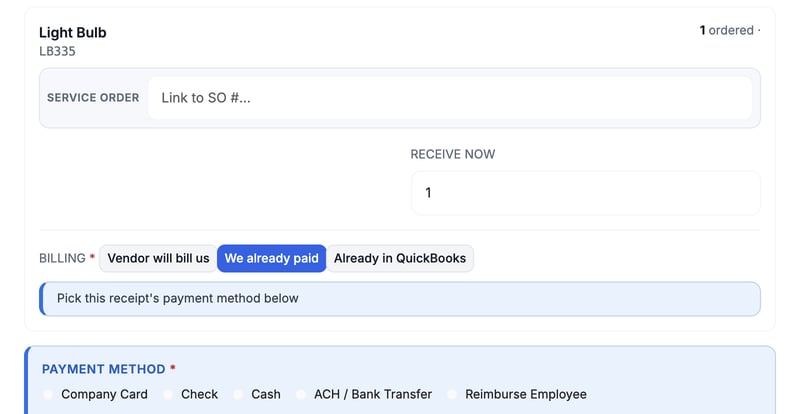
Company Card posts from your Company card account. Every other method posts from your Paid at the counter account. You set both under posting accounts, and the memo on the Expense names the PO and receipt. Ask your accountant which accounts to use. Choose Where Your Money Posts in QuickBooks shows where to set them.
One receipt has one payment method. If you paid some lines another way, receive those lines as their own receipt.
Expense or bill: how to choose
- Use We already paid when you paid at pickup or by card before leaving. QuickBooks records money already spent, so there is no bill to pay later.
- Use Vendor will bill us when the vendor sends an invoice to pay later. The bill is what you pay in QuickBooks.
What a vendor bill contains
On a purchase order, Create Vendor Bill asks for the Vendor invoice #, Bill date, Due date and Notes. It bills the received lines marked Vendor will bill us. Lines marked We already paid are not billed again.
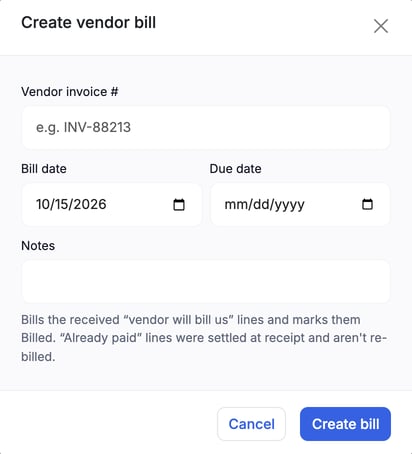
If you have the vendor's invoice as a PDF, JPG or PNG, Bill from invoice opens the Create vendor bill from invoice window. Upload the file and MetaFleet reads it and matches it to the order by PO number and part name. When a line's amount differs from the order, pick Bill at invoice price (selected to start with) or Bill at PO price. The bill takes the price you pick. The order's price does not change.
MetaFleet bills by quantity. Each bill takes the received units that no bill covers yet, so you can bill a partly received order in several bills.
| Bill line | Posts to |
|---|---|
| A part that has a QuickBooks item | That item. If your QuickBooks company tracks inventory, QuickBooks adds the billed units to the item's quantity on hand. MetaFleet does not send stock counts. |
| A part with no QuickBooks item | Your Cost of parts account. No stock changes. |
| Freight on the order | Your Freight on purchases account, as its own line. |
| Sales tax the vendor charged | Your Sales tax charged by vendors account, as its own line. It is a cost you paid the vendor. It is not tax you collect. |
The bill uses your vendor invoice number as its number (cut to 21 characters) and has "MetaFleet PO" and the PO number in its memo. Each part line is linked to its line on the QuickBooks purchase order, and the bill itself is linked to that purchase order too. A bill with no linked purchase order line has no link at all.
Freight and vendor tax are split across bills. Each bill takes a share of what earlier bills have not covered, in proportion to its part cost. The bills add up to the order's freight and tax. Freight and tax already sent on a We already paid receipt are taken off the share of later bills.
Item accounts and posting accounts are explained in How Parts, Labor and Fees Map to QuickBooks Items and How Posting Accounts Map to Your Chart of Accounts. Stock effects are in How Stock Adjustments and Inventory Value Reach QuickBooks.
How paid status comes back
MetaFleet never sends a payment to your vendor or to QuickBooks. You pay the bill in QuickBooks. In the nightly sync, or when you click Sync now on the Purchase orders row of the Sync tab, MetaFleet reads each open bill. When a bill has no balance left, its units show as paid and the order can reach Paid. The Bills row shows what was sent and read back, but its Sync now is on the Purchase orders row.
Mark bill paid on the purchase order marks the open bills paid in MetaFleet. Use it only after the vendor has been paid.
Void bill voids the vendor bill in MetaFleet and deletes the linked bill in QuickBooks.
See what reached QuickBooks
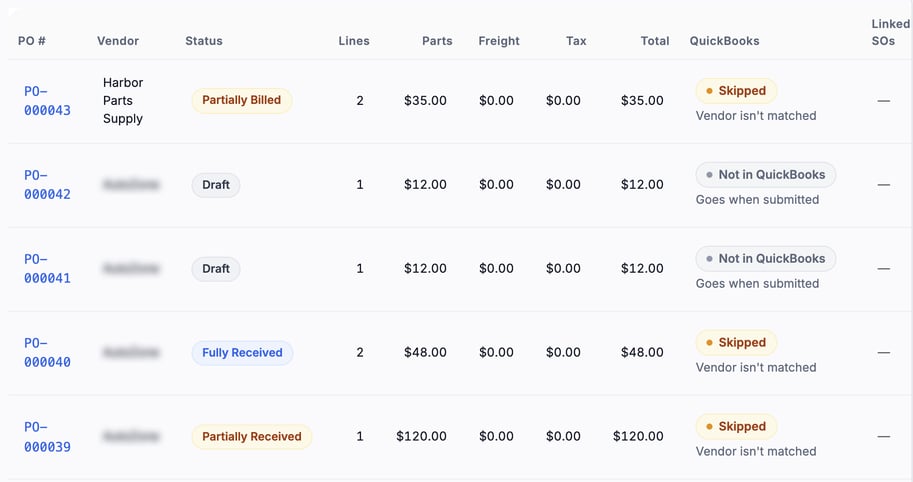
Once QuickBooks is connected, the purchase orders list has a QuickBooks column. It shows a status for each order and, under it, the reason. A draft reads Not in QuickBooks with Goes when submitted. An order held back because its vendor is not linked to a QuickBooks vendor reads Skipped with Vendor isn't matched.
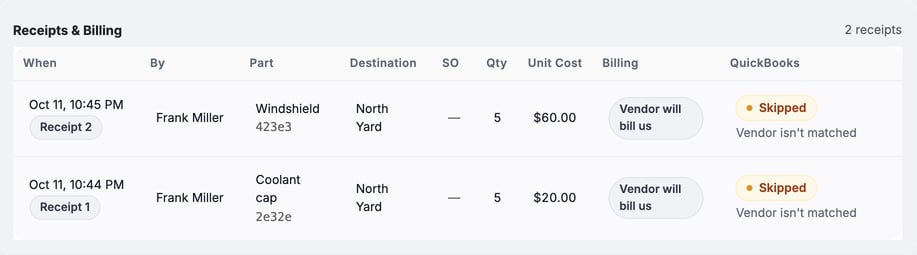
Open an order and the Receipts & Billing table has the same QuickBooks column for each receipt line.
Troubleshooting
| Symptom | Likely cause | Fix |
|---|---|---|
| A purchase order is not in QuickBooks | It is still a draft, it is canceled, every line is canceled, or it has not gone yet. | Click Place Order on a draft. A canceled order that never went stays out of QuickBooks. If the order is placed and has still not gone, click Sync now on the Purchase orders row. |
| QuickBooks refused a bill dated before an item's start date | A part on the bill has an inventory item in QuickBooks that starts after the bill date. | In QuickBooks, set that item's start date on or before the bill date, then click Retry on the Review tab. |
| A bill or Expense did not go | A posting account it needs is missing or broken. | Open the Review tab and fix the account. See Fix What Needs Attention in QuickBooks. |
| An order shows Skipped and Vendor isn't matched | The order's vendor is not linked to a QuickBooks vendor yet. | Click Sync now on the Vendors row so the vendor syncs, or confirm a near match on the Review tab. |
| A vendor waits on the Review tab | The names look alike but are not identical. | Open it and confirm whether it is the same vendor. |
| A bill still shows unpaid | The bill has a balance in QuickBooks, or the nightly sync has not run. | Pay the bill itself in QuickBooks, then click Sync now on the Purchase orders row. |
| QuickBooks has a vendor twin | The names differ in spelling. | Use one spelling in both places, then confirm the match on the Review tab. |
If a refused bill goes through on a later send, its old row on the Activity tab reads Sent since.
FAQs
Does a purchase order change my books?
No. QuickBooks keeps it as a non-posting record of what you ordered. Money posts when you record an Expense or a Bill.
Does MetaFleet pay my vendor?
No. You pay in QuickBooks, and MetaFleet reads the result.
Does Place Order email my vendor?
No. It locks the draft so you can receive against it. You send the order yourself.
Can I bill part of an order?
Yes. Bills are by quantity, so each bill takes the received units that are not billed yet.
Why did a part post to Cost of parts?
The part has no QuickBooks item. Link it to an item to have its stock tracked in QuickBooks.