
For: New team members who got an invite · Permission: none needed · Time: ~2 minutes
When your shop adds you to MetaFleet, you get an email from MetaFleet. There's no password to set: you join with a code that MetaFleet emails you.
Before you start
- You have the invite email. Its subject reads like "Dana Ortiz added you to Acme Fleet Services on MetaFleet".
- You can open that email address on the device you'll use to join.
Quick summary
- In the invite email, click Join and your shop's name.
- Click Email me a code.
- Enter the 6-digit code from the new email and click Join.
- Check your name and mobile phone, then click the button to go to MetaFleet.
Open the invite
The invite email says who added you, the shop's name and your role. Click the Join button in it. It works the same on a computer or in your phone's browser.
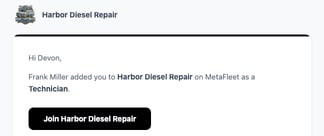
The page that opens is titled Join and your shop's name. It shows your email with the middle hidden. Click Email me a code.
The code always goes to the address the invite was sent to. If that's not your email, ask the person who invited you to check it.
Enter the code
- Open the new email from MetaFleet and copy the 6-digit code.
- On the Check your email page, enter the code and click Join.
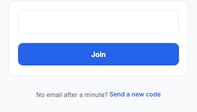
No email after a minute? Click Send a new code. Only the newest code works.
Check your details
The first time you join, a page says You're in with your first name.
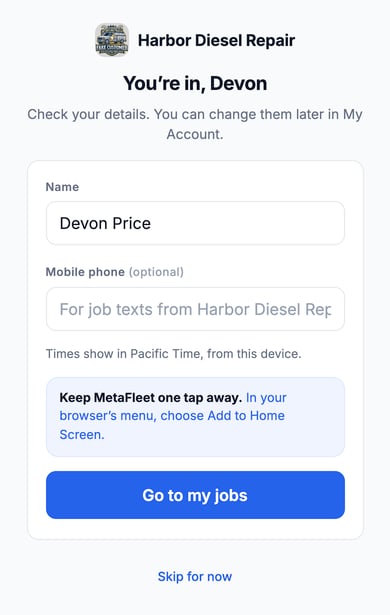
- Check your Name.
- Optional: add your Mobile phone. Technicians can use it for job texts from the shop.
- Click the button at the bottom. It takes you to your starting page:
| If you're a | The button says | It opens |
|---|---|---|
| Technician | Go to my jobs | Your technician dashboard |
| Dispatcher | Go to the dispatch board | The Command Center |
| Any other role | Go to MetaFleet | My Account |
You can also click Skip for now and change your details later in My Account. The page also says which time zone MetaFleet will show times in, taken from your device.
On a phone, add MetaFleet to your home screen so it's one tap away: in your browser's menu, choose Add to Home Screen.
Sign in after that
Go to your shop's MetaFleet sign-in page and enter your email. MetaFleet emails you a new 6-digit code each time. On the shared sign-in page you also enter your shop's Company ID. Ask your admin for it.
Only the newest code works. After 5 wrong tries, that code stops working, even if the next try is right. Ask for a new code and use that one. Your account never locks.
Troubleshooting
| The page says | Why | What to do |
|---|---|---|
| This invite has expired | Invites last 14 days. | Ask the person who invited you to send a new one. |
| This invite isn't active | It may have been cancelled. | Ask the person who invited you to send a new one. |
| You've already joined | You used this invite before. | Click Sign in and sign in with a code. |
| You're signed in as someone else | This browser is signed in to another MetaFleet account. | Click Sign out and continue to join, or stay signed in as the other person. |
| You can't sign in to this company | Your account may have been deactivated, or your invite may have expired. You see this after you enter the emailed code. | Ask your company's admin to reactivate your account or resend your invite. Click Go to sign in. Check the Company ID (if the page asks for one) and your email. |
| "Invalid code." | The code was typed wrong, an older code was used, or the code had 5 wrong tries. | Click Send a new code and enter the newest one. |
FAQs
Do I need a password?
No. MetaFleet emails you a code each time you sign in.
I didn't expect this email. What happens if I ignore it?
Nothing. No one can join with your invite unless they get the code from your inbox.