
For: Owners, managers and dispatchers · Permission: Access to Company Details › Companies · Time: 4-minute read
Quick summary
- Ask the contact for permission to text them.
- Record the consent in your own contract, CRM or customer file.
- Turn on text updates for that contact in MetaFleet.
Before you start
- The contact's mobile number, for example
+1 6195551234. - Access to Company Details › Companies.
- The contact's consent, recorded somewhere you can find it later.
Why consent comes first
MetaFleet uses text messages for job updates, authorization requests and service notices. Because these texts are automated, federal law (TCPA) and carrier guidelines (CTIA) require clear, documented consent before you send any.
- It protects your shop from regulatory penalties.
- It keeps carriers from flagging or blocking your messages.
- It respects each customer's communication preferences.
Collect and record consent
Your shop is responsible for getting and documenting consent before you turn on texts for a contact in MetaFleet.
- Ask for permission directly. Example: "Would you like to receive text updates about your service orders or job status?"
- Record the consent in your own systems:
- Add a line to your service contract, such as: "By signing this agreement, you consent to receive job and service updates via text message from [Shop Name]."
- Note it in your CRM, invoice system or customer profile (for example, "SMS consent received from John Smith on 11/11/2025").
- Or capture it with an online form, intake document or email confirmation.
Turn on text updates for a new contact
- Go to Company Details › Companies and open the company.
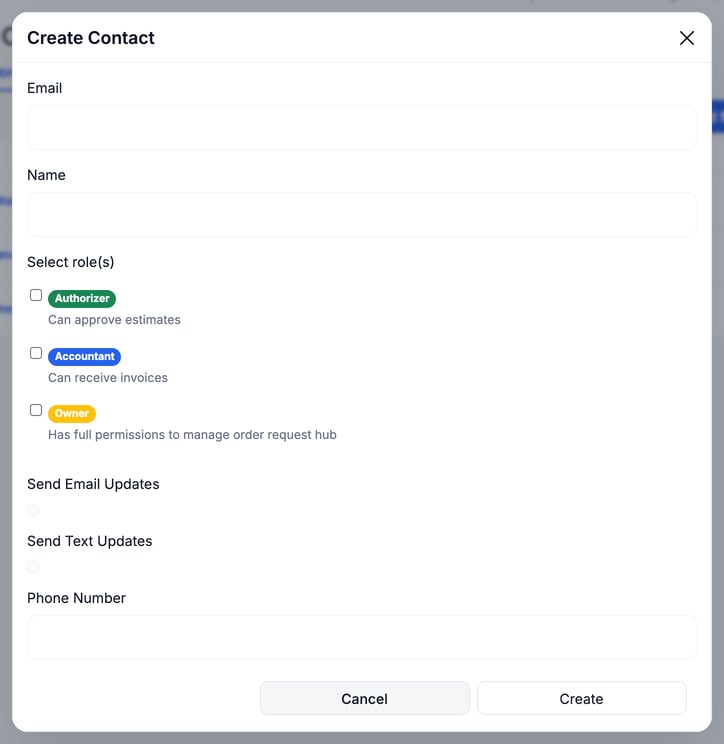
- Open the Contacts tab and click + Add New Member.
- Enter the contact's Phone Number, for example
+1 6195551234. - Check Send Text Updates only if you have recorded the contact's consent.
- Click Create.
Turn on text updates for an existing contact
- Go to Company Details › Contacts and click the contact's name.
- In Personal Details, click Edit.
- Check I agree to receive text message updates related to this service request. Standard messaging rates may apply. only if you have recorded the contact's consent.
- Click Save.
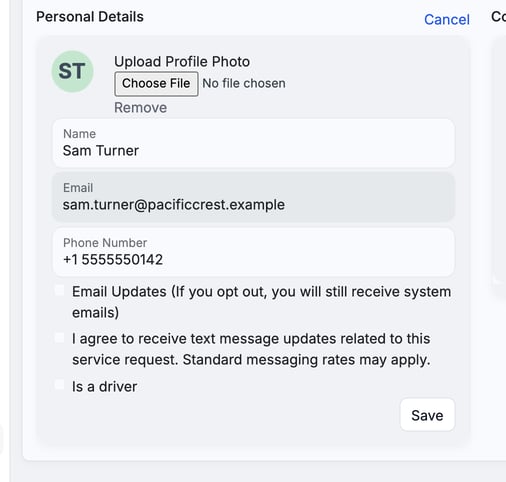
Checking the box is your statement that consent is on file. Leave it cleared for anyone who has not agreed.
What the customer controls
Customers can also manage texts from their own account. Their Text updates switch needs a verified mobile number, and they can reply STOP to opt out. Honor an opt-out right away, and clear the contact's text setting in MetaFleet.
Shared responsibility
| Party | Responsibility |
|---|---|
| Your shop | Get and document consent. Keep proof in your CRM, contracts or other records. |
| MetaFleet | Keeps each contact's text setting. |
| Customer | Verifies their mobile number, chooses which texts they get, and can reply STOP to opt out. |
Best practices
- Collect consent before you turn on text updates for a contact.
- Put consent language in every customer agreement or onboarding form.
- Store records securely for audits or disputes.
- Clear the contact's text setting as soon as a customer opts out or withdraws consent.
- Use plain language. Avoid small print or implied consent.
What happens if consent isn't recorded
- Carriers may fail or block your messages.
- Your shop could be held liable under TCPA or CTIA rules.
Troubleshooting
| Symptom | Likely cause | Fix |
|---|---|---|
| A contact gets no texts | The text setting is cleared, or the customer's Text updates switch is off because no mobile number is verified | Check the contact's setting, then ask the customer to verify their number and turn on Text updates. |
| A customer says they stopped getting texts | They replied STOP or turned off Text updates | Do not turn texts back on until you have fresh consent. |
FAQs
Is the checkbox enough as proof of consent?
No. The checkbox only records your choice in MetaFleet. Keep the proof of consent in your own records.
Where do I record the proof of consent?
In your own contract, CRM or customer file. MetaFleet holds the setting, not your paperwork.
Can a customer opt out later?
Yes. They can reply STOP or turn off Text updates in their account. Then clear the contact's text setting.