
Who this is for
Shops that stock parts on mobile units. A service vehicle is a rolling inventory location, assigned to the tech who runs it.
What you'll learn
How to add a service vehicle, assign a technician custodian, and view the stock it carries — so truck inventory is as accurate as your warehouse.
Before you start
- You'll need: Inventory-management access. Service vehicles live under Parts & Inventory → Service Vehicles.
- Good to know: A service vehicle is a Vehicle-type inventory location — everything you know about stocking a location applies, it just travels with the tech.
Quick summary
- Go to Parts & Inventory → Service Vehicles.
- Click + New Vehicle; enter a name and assign a technician.
- Open the vehicle's inventory to receive and track the parts on board.
Step-by-step
Open Service Vehicles.
Go to Parts & Inventory → Service Vehicles. Each row shows the assigned technician, how many items are on board, and status.
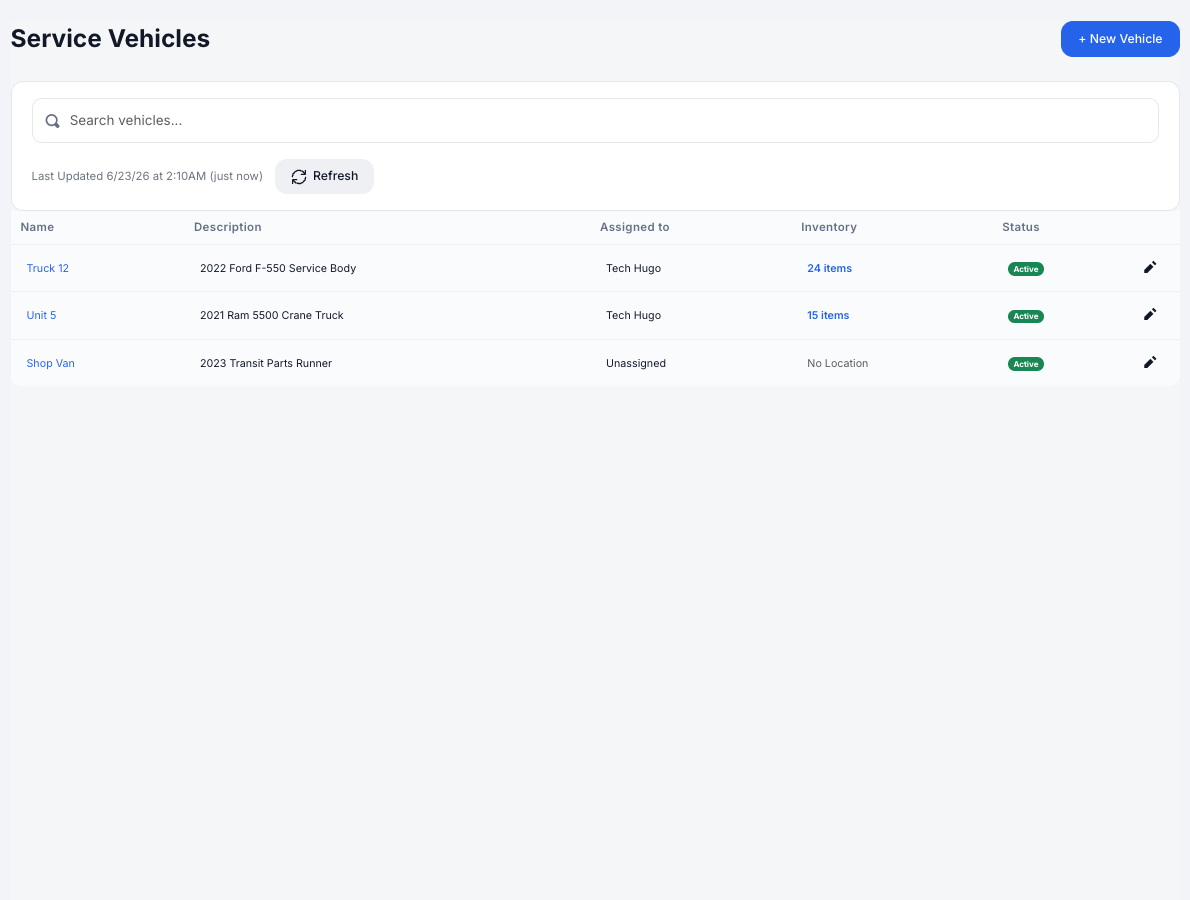
Service Vehicles — the truck, its custodian (Assigned to), and its on-board item count.
Add a vehicle.
Click + New Vehicle. Give it a Name (e.g. Truck 12), an optional description, license plate, and unit number, then choose the technician under Assign to — that's the custodian responsible for its stock. The Assign to list shows technicians only — users whose role lets them repair vehicles — so dispatcher-only and roleless accounts won't appear there.
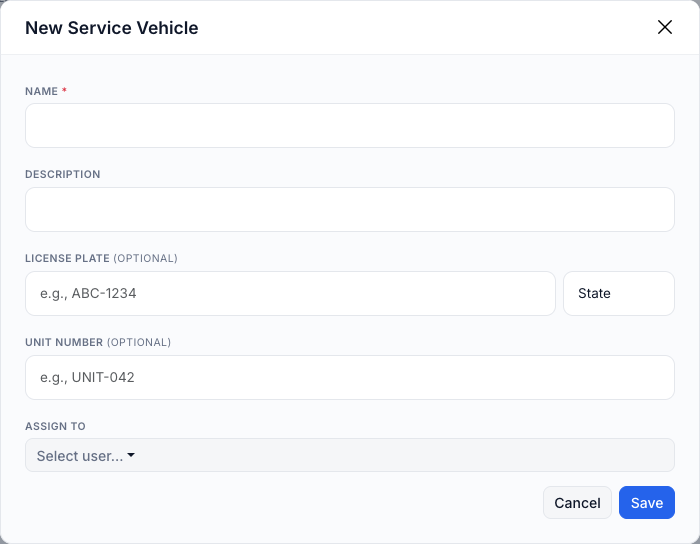
Creating a service vehicle, including the Assign to custodian.
Stock and view the vehicle's inventory.
Click the vehicle's item count (or its name) to open its stock — the same Stock tab as any location. Receive parts onto the truck, set thresholds, and run cycle counts just as you would for a warehouse.
Reassign as needed.
Use the row's pencil to edit the vehicle or change its custodian. Reassignments are tracked, so you always know who held the truck's stock and when.
Parts used on the road are deducted automatically. When a tech uses a part from the truck on a service order, it's pulled from that vehicle's stock when the job completes — no manual issuing needed. And when the office hands off a part to a tech for a job, the tech accepting it relocates that part onto their truck's inventory automatically (see Source & Hand Off Parts to a Technician). (See also Receive, Issue & Adjust Stock and Understanding Available / Allocated / Consumed.)
Troubleshooting
| Symptom | Likely cause | Fix |
|---|---|---|
| A vehicle shows "No Location / Unassigned" | No custodian assigned yet | Edit the vehicle and pick a technician under Assign to. |
| The truck's parts aren't deducting | Parts may not have been added to that vehicle's stock | Receive the parts onto the vehicle first (open its inventory → Receive Stock). |
| The person I want isn't in the Assign to list | The list only includes technicians — users whose role can repair vehicles. Dispatcher-only and roleless accounts are excluded. | Give the user a technician role (one that allows repairing vehicles) under Platform Settings → Users, then reopen the picker. Also confirm the user exists and is active. |
FAQs
Is a service vehicle different from a regular inventory location?
It's a Vehicle-type location — same stock features, but it's assigned to a technician and travels to jobs.
Who is the "custodian"?
The technician assigned to the vehicle — the person accountable for the parts on board.
Why can't I assign a dispatcher or a user with no role?
A service vehicle has to be held by someone who works on vehicles, so the Assign to list only offers technicians — users whose role allows repairing vehicles. Dispatcher-only and roleless accounts won't show up. If a vehicle was assigned to someone who has since changed roles, the original name still displays, but you'll only be able to reassign it to a technician.
Can I move parts between a truck and the warehouse?
Yes — use Transfer (see Inventory Transactions & Transfers).