
Whoever keeps jobs moving when a part is missing — service writers and parts staff sourcing parts, and dispatchers watching for jobs stuck waiting.
What you'll learnHow a job becomes "blocked on parts," how to read and work the Parts Watch board, the two ways to source a part (pull from stock or order from a vendor), how the technician is notified and accepts the part onto their truck, and how a tech leaves the board once they have it.
How a job gets blocked on partsWhile diagnosing or repairing, a technician flags a part they need but don't have on hand. That part is marked short, the work item enters a waiting state, and the job shows up on Parts Watch for the office to source. The technician keeps working anything else on the job, but that work item waits until the part arrives.
The Parts Watch boardOpen Command Center → Parts Watch. Across the top, four counts frame the situation: Techs blocked, Parts short, Sourceable in range (stock you could pull within your distance threshold), and Need a vendor PO (no nearby stock). Filter by All blocked / Sourceable / Vendor only, and set the Source within distance (30 min · 1 hr / 60 mi · 2 hr · Any distance).
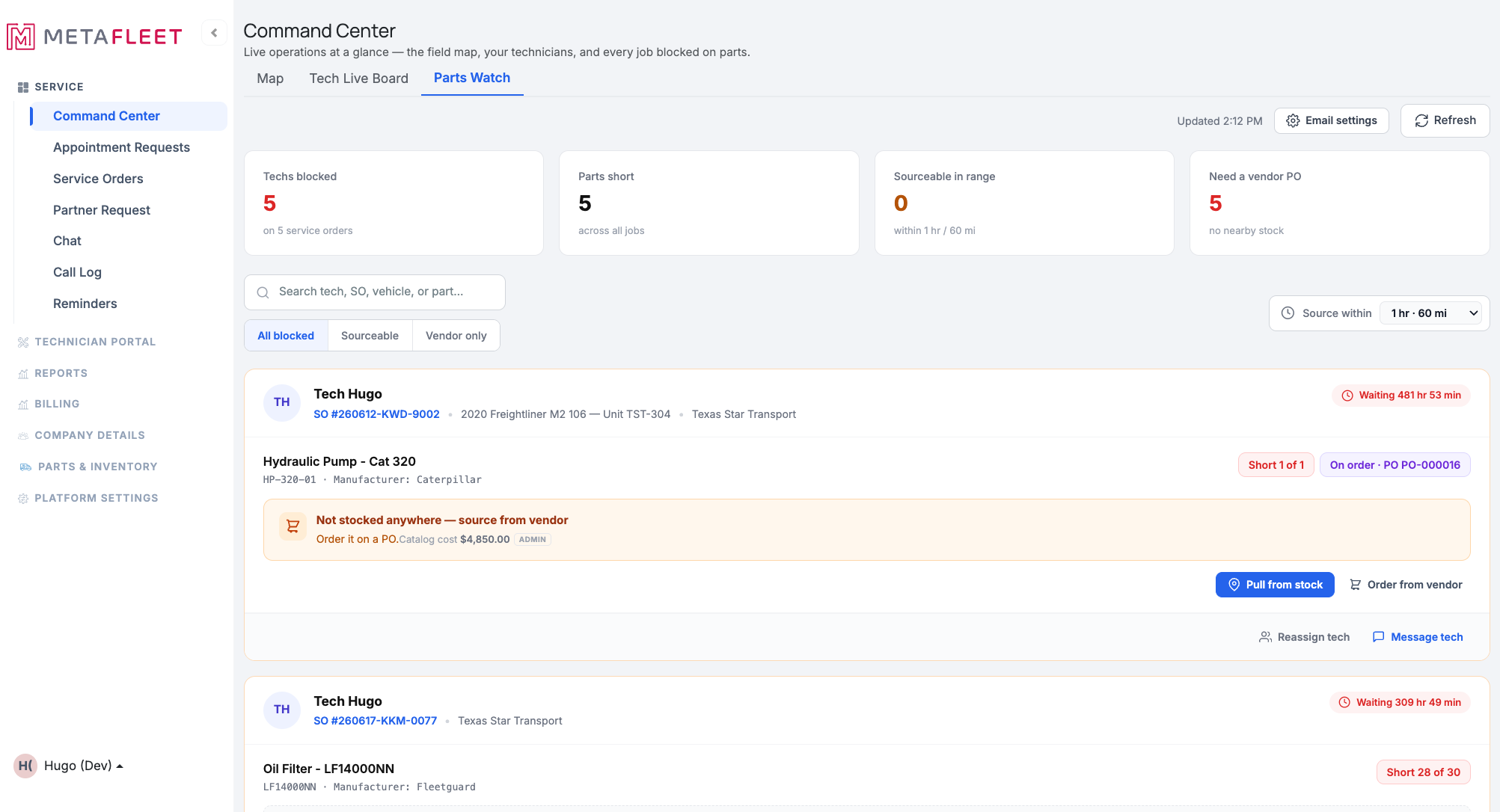
Every job blocked on a part, with a live wait timer and the fastest way to source each one.
Each card is one blocked job — the technician, service order, vehicle, and customer, with a wait timer showing how long the job has been blocked on that part. The part line shows what's short (e.g. Short 1 of 1), its manufacturer, and where the nearest stock is and how far — so you can tell at a glance whether to pull it or order it.
Sourcing a partPull from stock
Pull from stock opens the stock picker with locations ordered nearest first, so you can move the part from the closest warehouse or truck that has it. Once pulled, it's reserved for this job and ready to hand to the tech.
Order from vendor
When there's no nearby stock, Order from vendor creates the purchase order for you — it picks the part's vendor and reserves a single PO (as a Draft), with a link straight to it. The part shows On order · PO-#### on the job so everyone can see it's handled. (See Create a PO from a Work Item or Service Order and Manage Purchase Orders.)
Two more actions on each card. Reassign tech hands the whole job to a different technician (handy if someone closer already has the part), and Message tech opens a quick line to the technician about the part.Notifying the technician & handing off
When a part is sourced and on its way, MetaFleet notifies the technician — a part-needed alert (and an email, if your shop has it on; tune this under Email settings on the board). On the tech's side, an incoming parts strip shows what's coming, and they accept the part when they receive it. Accepting relocates the part onto the technician's truck inventory automatically, so the truck's stock stays accurate (see Track Inventory on Service Vehicles).
A tech stays on the board until they actually have the part. The job doesn't drop off Parts Watch when you order or pull — it clears only when the technician accepts (receives) the part. The wait timer measures time the job is blocked on the part, not general activity, so the board reflects the real shortage.Troubleshooting
| Symptom | Likely cause | Fix |
|---|---|---|
| "Sourceable in range" is 0 | No stock within your distance threshold | Widen Source within (e.g. Any distance), or use Order from vendor. |
| A part says "Not stocked anywhere" | No location carries it | Use Order from vendor — it drafts the PO and links it to the job. |
| The job's still on the board after I ordered | The tech hasn't received the part yet | That's expected — a job clears only when the technician accepts the part. |
| The tech didn't get a heads-up | Email notifications may be off | Check Email settings on the Parts Watch board. |
Where do I find jobs waiting on parts?
Command Center → Parts Watch — every blocked job, with a wait timer and one-click sourcing.
What's the difference between Pull from stock and Order from vendor?
Pull from stock moves a part you already have (nearest location first). Order from vendor creates a purchase order when no nearby stock exists.
What happens to the part when the tech accepts it?
It relocates onto that technician's truck inventory automatically, keeping the truck's stock accurate.
When does a job leave the Parts Watch board?
When the technician accepts (receives) the part — not when you order or pull it.
Can I just give the job to a closer tech instead?
Yes — use Reassign tech on the card.