
MetaFleet handles sales tax by jurisdiction: you build a Tax Group for each area you work in, attach it to the service location where the work happens, and every estimate and invoice for that location picks up the right combined rate automatically.
For: Admins & Accounting · Permission: Account administration · Time: ~6 minutes
What changed. Tax setup is simpler than before — there are no more "tax categories." The model is just Tax Groups (a jurisdiction) made of one or more individual taxes, attached to your service locations. If you used categories before, that layer is gone; set rates up per jurisdiction instead.Who this is for
Admins and accounting staff who set up what tax gets charged, and where.
What you'll learnThe Tax Group model, how to create one for a jurisdiction, how to attach it to a service location, how a job picks up its tax, how exemptions work, and where tax shows up on reports.
How tax works now- Tax Group — a named jurisdiction (e.g. Houston (Harris County)) that bundles every tax that applies there.
- Individual taxes — the line-item rates inside a group (e.g. Texas State Sales Tax 6.25%, Harris County Local 1%, City Local 1%). They add up to the group's combined rate.
- Service location — each location is assigned a Tax Group as its jurisdiction. Jobs at that location use it.
Open Taxes.
Go to Account Details → Taxes. You'll see your Tax Groups, each listing the individual taxes inside it. Use the Active / Archived tabs to manage older groups.
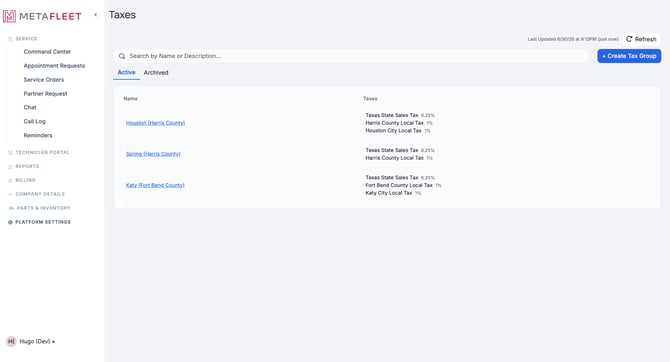
Tax Groups by jurisdiction — each bundles the state, county, and city taxes that apply there.
Add the group and its taxes.
Click + Create Tax Group, name it for the jurisdiction, then add each individual tax — a name and a rate — for the state, county, and any city or special-district taxes. The group's combined rate is the sum of its lines.
Attach a Tax Group to a service locationA Tax Group only does something once it's tied to where work happens. Open Account Details → Service Locations, pick a location, and set its jurisdiction (Tax Group) on the location's tax settings. From then on, estimates and invoices for jobs at that location use that group's rate.
It shows up while you work, too. When you create a service order and the unit location is geocoded, MetaFleet shows the tax jurisdiction that applies. If a location hasn't been given a Tax Group yet, you'll see a "Tax not configured" flag on the job — the order still saves; come back here and attach a group to clear it.Exemptions
Some customers are tax-exempt. You can record an exemption so their jobs aren't taxed even in a taxed jurisdiction — set it on the customer, with the exemption details for your records.
Tax on reportsTax reporting is organized by state first, so you can see what you've collected per jurisdiction for filing. Pull it from Reports (the sales-tax export) for your accounting.
Troubleshooting| Symptom | Likely cause | Fix |
|---|---|---|
| A job shows "Tax not configured" | That location has no Tax Group attached | Open the service location and set its jurisdiction (Tax Group). |
| I can't find tax categories | Categories were removed in the new model | Use Tax Groups + individual taxes per jurisdiction instead. |
| The wrong rate applied to a job | The location's Tax Group is wrong, or the rate inside it is off | Check the location's jurisdiction, then the individual taxes in that group. |
| A customer was taxed who shouldn't be | No exemption on file | Add a tax exemption to that customer. |
What happened to tax categories?
They're gone. The model is now Tax Groups (a jurisdiction) made of individual taxes, attached to service locations.
How does a job know which tax to use?
From the service location where the work happens — its assigned Tax Group sets the rate.
How do I tax a multi-rate area?
Add each rate as an individual tax inside one Tax Group (state + county + city); the group combines them.
How do I handle a tax-exempt customer?
Record an exemption on the customer; their jobs won't be taxed.
Where do I get numbers for filing?
The sales-tax report under Reports, organized by state.