---
title: Set Overtime Rules for a Service Location
description: "Set a service location's own overtime rules: weekly hours, 7th straight workday, holiday rate and daily steps. Hours only, never pay."
---
[Skip to content](https://support.metafleet.ai/set-overtime-rules-for-a-service-location#main-content)
English
Show submenu for translations

Open main navigation
Close main navigation
- English
Show submenu for translations
- [Contact us](mailto:support@metafleet.ai)
[Contact us](mailto:support@metafleet.ai)
How can we help you?
- There are no suggestions because the search field is empty.
1. [MetaFleet Answer Hub](https://support.metafleet.ai/?hsLang=en)
2. [Dispatch & Scheduling](https://support.metafleet.ai/dispatch-scheduling?hsLang=en)
3. [Technician Schedule](https://support.metafleet.ai/dispatch-scheduling?hsLang=en#technician-schedule)
# Set Overtime Rules for a Service Location
## Give one service location its own overtime rules, so the technicians based there are counted by that location's weekly limit, daily steps and holiday rate.
**For:** Admins and dispatchers · **Permission:** Manage technician schedules · **Time:** ~5 minutes
### Quick summary
1. Open **Settings › Company › Service Locations** and click the location.
2. Open the **Overtime Rules** tab.
3. Set the weekly limit, the 7th straight workday switch, the holiday rate and any daily steps.
4. Click **Save**.
MetaFleet tracks overtime **hours** only. It never calculates pay.
### Before you start
- You need the **Manage technician schedules** permission to save, and access to **Service Locations** in Settings to open the page. Without the permission, you can't save.
- The location must already exist. See [Create a Service Location](https://support.metafleet.ai/create-a-service-location?hsLang=en).
- Each technician needs this location set as their **Service location** on their recurring schedule. See [Give a Technician a Recurring Schedule](https://support.metafleet.ai/give-a-technician-a-recurring-schedule?hsLang=en).
### Which rules apply to a technician
1. If you have saved overtime rules on the technician's service location, those rules apply.
2. If you haven't, or the technician has no service location, the shop-wide **Default overtime rules** apply. You set those in [Set Up Technician Shifts](https://support.metafleet.ai/technician-shifts-and-scheduling?hsLang=en).
On the technician's weekly schedule, the rules follow the technician's service location.
### Step 1: Open the location's Overtime Rules tab
Go to **Settings › Company › Service Locations**. Click the location's name, then click **Overtime Rules**.

### Step 2: Review the tab
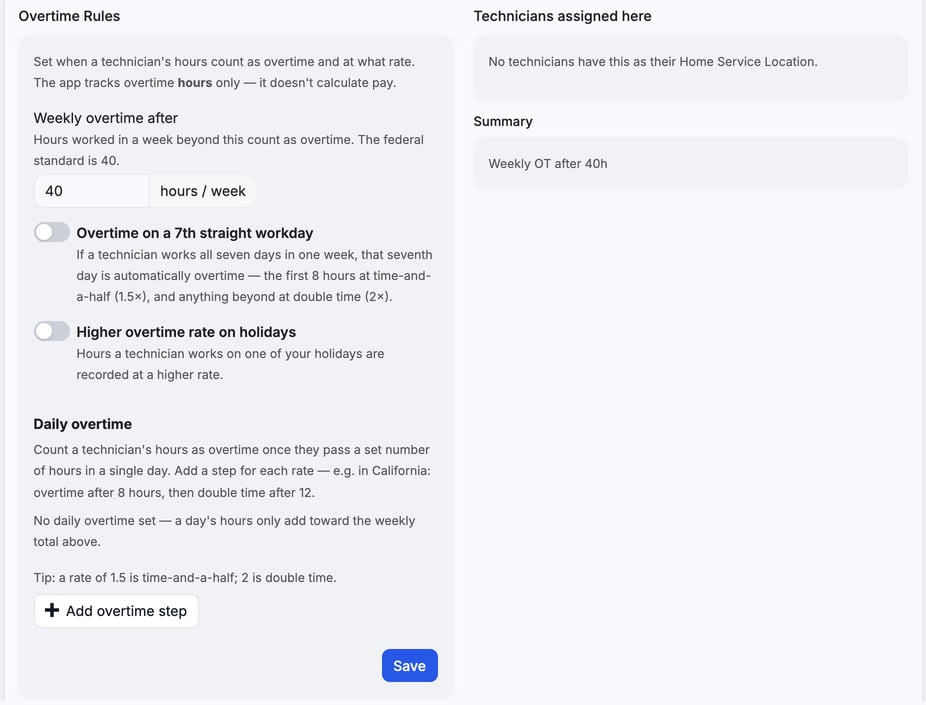
The tab opens with a weekly limit of 40 hours, both switches off and no daily steps ("No daily overtime set"). Those 40 hours are only the starting values on the form. Until you click **Save**, the location keeps using the shop-wide default. The card on the right, **Technicians assigned here**, lists the technicians who use this location. The **Summary** card repeats your rules in one line, such as "Weekly OT after 40h".
### Step 3: Set the rules
1. **Weekly overtime after:** enter the hours a technician can work in a week before overtime starts. The federal standard is 40.
2. **Overtime on a 7th straight workday:** turn it on if a technician who works all seven days should get overtime on the seventh. The first 8 hours count at 1.5×, and anything beyond at 2×. These rates are fixed.
3. **Higher overtime rate on holidays:** turn it on to record holiday hours at a higher rate. Then enter the rate next to **Count holiday hours at**, such as 1.5 or 2.
4. **Daily overtime:** click **Add overtime step** for each daily rate. In each step, enter **Overtime after** (hours per day) and **Rate** (× normal). California, for example, uses one step after 8 hours at 1.5 and a second after 12 hours at 2.
5. To drop a step, click the trash icon beside it. The tab has no reset button, so to remove every step, delete each one.
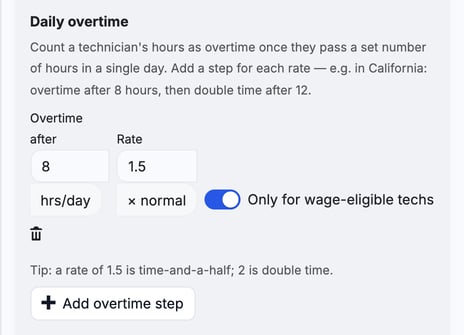
> **Wage-eligible steps.** Turn on **Only for wage-eligible techs** on a step to apply it only to technicians marked **Eligible for wage-conditional overtime** on their [recurring schedule](https://support.metafleet.ai/give-a-technician-a-recurring-schedule?hsLang=en). Other technicians skip that step.
### Step 4: Save
Click **Save**. A green "Overtime rules saved." message appears. Nothing changes until you save, and leaving the page discards edits. There is no way back to "no rules": once you save here, this location stops using the shop-wide default.
### Where you see the result
Overtime hours show in the **OT · this week** column on Technician Schedule. See [Run the Weekly Technician Schedule](https://support.metafleet.ai/run-the-weekly-technician-schedule?hsLang=en).
### Troubleshooting
| Symptom | Likely cause | Fix |
| --- | --- | --- |
| You can't save | You lack the Manage technician schedules permission | Ask an admin to grant it. |
| **Technicians assigned here** says "No technicians have this as their Home Service Location." | No technician has this location as their service location | Set the location on each technician's recurring schedule. |
| A technician still gets the shop-wide rules | The technician has no service location, or this location has no saved rules | Set their service location, then save rules here. |
| A daily step doesn't count for a technician | The step is limited to wage-eligible techs | Turn on **Eligible for wage-conditional overtime** for that technician, or turn the step's switch off. |
### FAQs
**Does MetaFleet calculate overtime pay?**
No. It tracks hours only. Multipliers here set how hours are counted.
**Do these rules change the shop-wide default?**
No. They apply only to technicians at this location.
**Can I set different rules for each location?**
Yes. Each location has its own Overtime Rules tab.
### Related articles
- [Set Up Technician Shifts](https://support.metafleet.ai/technician-shifts-and-scheduling?hsLang=en)
- [Give a Technician a Recurring Schedule](https://support.metafleet.ai/give-a-technician-a-recurring-schedule?hsLang=en)
- [Run the Weekly Technician Schedule](https://support.metafleet.ai/run-the-weekly-technician-schedule?hsLang=en)
- [Create a Service Location](https://support.metafleet.ai/create-a-service-location?hsLang=en)
- [Start Here](https://support.metafleet.ai/start-here?hsLang=en)
- [Companies & Contacts](https://support.metafleet.ai/companies-contacts?hsLang=en#main-content)
- [Create/Edit Companies](https://support.metafleet.ai/companies-contacts?hsLang=en#create-edit-companies)
- [Contacts](https://support.metafleet.ai/companies-contacts?hsLang=en#contacts)
- [Vehicles](https://support.metafleet.ai/companies-contacts?hsLang=en#vehicles)
- [Work Intake (Requests & Service Orders)](https://support.metafleet.ai/work-intake-requests-service-orders?hsLang=en#main-content)
- [Creating Service Orders](https://support.metafleet.ai/work-intake-requests-service-orders?hsLang=en#creating-service-orders)
- [Customer & Partner Requests](https://support.metafleet.ai/work-intake-requests-service-orders?hsLang=en#customer-partner-requests)
- [Reference](https://support.metafleet.ai/work-intake-requests-service-orders?hsLang=en#reference)
- [Customer Portal](https://support.metafleet.ai/work-intake-requests-service-orders?hsLang=en#customer-portal)
- [Estimates & Approvals](https://support.metafleet.ai/estimates-approvals?hsLang=en#main-content)
- [Approval Gates](https://support.metafleet.ai/estimates-approvals?hsLang=en#approval-gates)
- [Estimates](https://support.metafleet.ai/estimates-approvals?hsLang=en#estimates)
- [Invoices](https://support.metafleet.ai/estimates-approvals?hsLang=en#invoices)
- [Billing](https://support.metafleet.ai/estimates-approvals?hsLang=en#billing)
- [Parts, Inventory & Vendors](https://support.metafleet.ai/parts-inventory-vendors?hsLang=en#main-content)
- [Add Parts & Kits](https://support.metafleet.ai/parts-inventory-vendors?hsLang=en#add-parts-kits)
- [Stock & Counts](https://support.metafleet.ai/parts-inventory-vendors?hsLang=en#stock-counts)
- [Locations & Bins](https://support.metafleet.ai/parts-inventory-vendors?hsLang=en#locations-bins)
- [Purchase Orders](https://support.metafleet.ai/parts-inventory-vendors?hsLang=en#purchase-orders)
- [Parts Catalog](https://support.metafleet.ai/parts-inventory-vendors?hsLang=en#parts-catalog)
- [Vendors & Manufacturers](https://support.metafleet.ai/parts-inventory-vendors?hsLang=en#vendors-manufacturers)
- [Pricing](https://support.metafleet.ai/parts-inventory-vendors?hsLang=en#pricing)
- [Service Vehicles](https://support.metafleet.ai/parts-inventory-vendors?hsLang=en#service-vehicles)
- [Sourcing & Hand-Off](https://support.metafleet.ai/parts-inventory-vendors?hsLang=en#sourcing-hand-off)
- [Part Numbers](https://support.metafleet.ai/parts-inventory-vendors?hsLang=en#part-numbers)
- [Notifications](https://support.metafleet.ai/parts-inventory-vendors?hsLang=en#notifications)
- [Reports](https://support.metafleet.ai/parts-inventory-vendors?hsLang=en#reports)
- [Invoicing & Payments](https://support.metafleet.ai/invoicing-payments?hsLang=en)
- [Dispatch & Scheduling](https://support.metafleet.ai/dispatch-scheduling?hsLang=en#main-content)
- [Preventative Maintenance](https://support.metafleet.ai/dispatch-scheduling?hsLang=en#preventative-maintenance)
- [Technician Assignment](https://support.metafleet.ai/dispatch-scheduling?hsLang=en#technician-assignment)
- [Scheduling & Calendar](https://support.metafleet.ai/dispatch-scheduling?hsLang=en#scheduling-calendar)
- [Technician Schedule](https://support.metafleet.ai/dispatch-scheduling?hsLang=en#technician-schedule)
- [Technicians & Mobile App](https://support.metafleet.ai/technicians-mobile-app?hsLang=en#main-content)
- [Time Tracking](https://support.metafleet.ai/technicians-mobile-app?hsLang=en#time-tracking)
- [Tech Workflow](https://support.metafleet.ai/technicians-mobile-app?hsLang=en#tech-workflow)
- [Evidence & Photos](https://support.metafleet.ai/technicians-mobile-app?hsLang=en#evidence-photos)
- [AI Assistant](https://support.metafleet.ai/technicians-mobile-app?hsLang=en#ai-assistant)
- [Alerts, Alarms & Notifications](https://support.metafleet.ai/alerts-alarms-notifications?hsLang=en#main-content)
- [Email/SMS/App Settings](https://support.metafleet.ai/alerts-alarms-notifications?hsLang=en#email-sms-app-settings)
- [Reporting & Dashboards](https://support.metafleet.ai/reporting-dashboards?hsLang=en)
- [Admin & Settings](https://support.metafleet.ai/admin-settings?hsLang=en#main-content)
- [Rates & Fees](https://support.metafleet.ai/admin-settings?hsLang=en#rates-fees)
- [Branding](https://support.metafleet.ai/admin-settings?hsLang=en#branding)
- [Roles, Permissions & Users](https://support.metafleet.ai/admin-settings?hsLang=en#roles-permissions-users)
- [Service Areas](https://support.metafleet.ai/admin-settings?hsLang=en#service-areas)
- [Workflows](https://support.metafleet.ai/admin-settings?hsLang=en#workflows)
- [Taxes](https://support.metafleet.ai/admin-settings?hsLang=en#taxes)
- [Integrations](https://support.metafleet.ai/admin-settings?hsLang=en#integrations)
- [Integrations](https://support.metafleet.ai/integrations?hsLang=en#main-content)
- [Phone Setup](https://support.metafleet.ai/integrations?hsLang=en#phone-setup)
- [AI Assistant Access](https://support.metafleet.ai/integrations?hsLang=en#ai-assistant-access)
- [QuickBooks](https://support.metafleet.ai/integrations?hsLang=en#quickbooks)
- [Getting Around](https://support.metafleet.ai/getting-around?hsLang=en#main-content)
- [Search & Command Bar](https://support.metafleet.ai/getting-around?hsLang=en#search-command-bar)
[](http://www.metafleet.ai)
[mailto:support@metafleet.ai](mailto:support@metafleet.ai)
Copyright © 2025, MetaFleet, Inc