---
title: Fix Parts That Didn't Come Out of Stock
description: Review the Reconciliation list, issue or dismiss parts that weren't deducted when an order closed, and fix the setup that caused it.
---
[Skip to content](https://support.metafleet.ai/review-inventory-reconciliation#main-content)
English
Show submenu for translations

Open main navigation
Close main navigation
- English
Show submenu for translations
- [Contact us](mailto:support@metafleet.ai)
[Contact us](mailto:support@metafleet.ai)
How can we help you?
- There are no suggestions because the search field is empty.
1. [MetaFleet Answer Hub](https://support.metafleet.ai/?hsLang=en)
2. [Parts, Inventory & Vendors](https://support.metafleet.ai/parts-inventory-vendors?hsLang=en)
3. [Stock & Counts](https://support.metafleet.ai/parts-inventory-vendors?hsLang=en#stock-counts)
# Fix Parts That Didn't Come Out of Stock
## Find parts that couldn't be taken out of stock when an order closed, issue them by hand, and stop it from happening again.
**For:** Parts managers and admins · **Permission:** Manage inventory · **Time:** ~3 minutes per part
### Quick summary
1. Open **Parts & Inventory › Reconciliation**.
2. Read the **Reason** for each pending row.
3. Choose **Manual Issue** and pick the location the part came from.
4. Fix the setup behind the reason so new orders deduct on their own.
### Why a part lands in Reconciliation
When an order closes, MetaFleet takes each part out of stock. It tries the order's own reservation first, then the technician's service vehicle, then a default shop. A part that can't be taken from any of these goes to the Reconciliation list. Nothing is lost: the row waits for you. A PM visit works the same way for parts the technician added during the visit.
| Reason on screen | What it means |
| --- | --- |
| **No Location** | The technician has no service vehicle and no default shop applies. |
| **Not Stocked** | The location doesn't stock the part, or has less than the order used. |
| **Error** | Something went wrong while taking the part out of stock. |
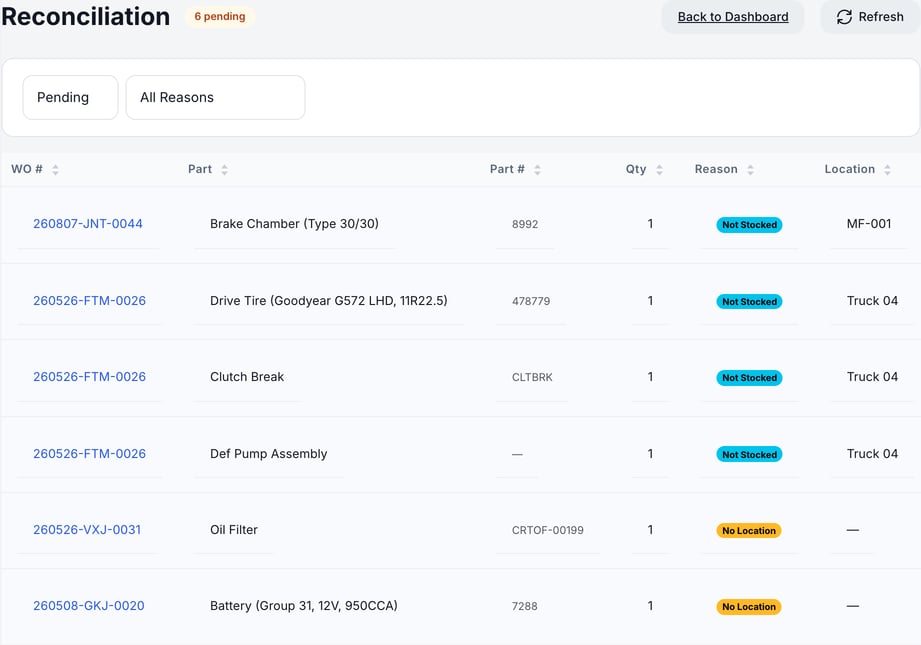
A PM visit that uses more of a part than the location has on hand takes what is there, down to 0, and sends the rest here as **Not Stocked**. It never takes stock below zero. For a PM part that isn't stocked, the **Location** column names the technician's truck or the area's default shop. A **No Location** row shows a dash there. Non-standard parts raise no row.
### Before you start
- You need the Manage inventory permission. Without it, **Reconciliation** doesn't appear in the menu.
- Know where the part really came from: a vehicle or a shop shelf.
### Open the Reconciliation list
You can get there two ways:
- Open **Parts & Inventory › Reconciliation**.
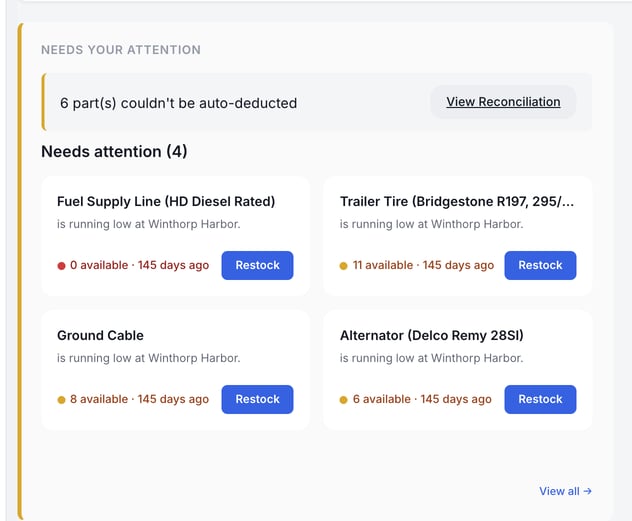
- On **Parts & Inventory › Inventory Dashboard**, click **View Reconciliation** in the row that reads "N part(s) couldn't be auto-deducted". The **Reconciliation** button at the top shows the same count.
The badge next to the title shows how many rows are pending. Each row shows the order number (**WO #**), the part, the part number, the quantity, the reason and the location. A PM row shows a dash (—) under **WO #**, because a PM visit has no service order. **Manual Issue** works the same on it.
### Filter the list
The list opens on **Pending**. Switch the first filter to **Resolved**, **Dismissed** or **All** to see past rows. The second filter limits the list to one reason: **No Vehicle / No Default**, **Part Not Stocked** or **System Error**. Click **Refresh** to reload.
### Issue the part by hand
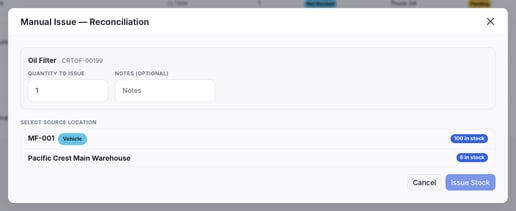
1. **Open the menu.** Click **⋯** at the end of the row, then **Manual Issue**.
2. **Check the quantity.** **Quantity to issue** is filled in from the order. Change it only if the order used a different amount.
3. **Add a note.** **Notes (optional)** is a good place for what happened.
4. **Pick the source.** Under **Select source location**, choose where the part came from. Each location shows how many it has in stock. A location with 0 can't cover the quantity, so pick one with enough. Service vehicles carry a **Vehicle** badge.
5. **Click Issue Stock.** The stock comes out of that location and the row moves to **Resolved**.
> If the window says **This part isn't stocked at any location**, no location has the part. Receive the part first (see [Receive, Issue and Adjust Stock](https://support.metafleet.ai/receive-issue-and-adjust-stock?hsLang=en)), then issue it.
### Dismiss a row
Choose **Dismiss** from the **⋯** menu when the part wasn't used, or when you handled the stock another way. **Dismiss** doesn't ask you to confirm or give a reason, and the row moves to **Dismissed** at once. Dismissing doesn't change stock.
> Check the part before you dismiss. If the part was used and you dismiss the row, your stock count stays too high.
### Stop it from happening again
- **No Location:** assign a service vehicle to the technician (see [Track Inventory on Service Vehicles](https://support.metafleet.ai/track-inventory-on-service-vehicles?hsLang=en)).
- **Not Stocked:** add the part to the vehicle or shop that usually supplies it, and keep enough on hand.
- **Error:** click **Refresh** to reload the list. **Refresh** only reloads; it doesn't retry the deduction. If the row stays, use **Manual Issue**.
### Check what needs restocking
The **Inventory Dashboard** has a **Needs attention** list. Each card names a part that is running low at a location and shows how many are available.
- A red dot means 0 available.
- An amber dot means the part is below its minimum.
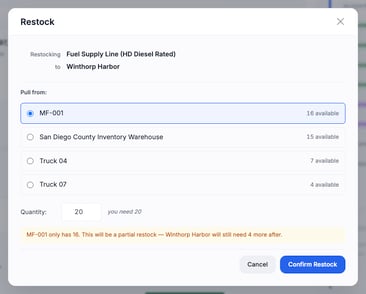
Each card has a **Restock** button. It opens a window with the part and the destination filled in. Pick the location to pull from and check the quantity, which starts at the shortage. A note appears when the source can't cover it all. Click **Confirm Restock** to move the stock, or **Cancel** to close the window without moving it. Receiving and issuing stay with [Receive, Issue and Adjust Stock](https://support.metafleet.ai/receive-issue-and-adjust-stock?hsLang=en).
To set the minimums that drive these cards, see [Low-Stock Alerts and the Weekly Inventory Digest](https://support.metafleet.ai/low-inventory-notifications?hsLang=en).
### Troubleshooting
| Symptom | Likely cause | Fix |
| --- | --- | --- |
| **Reconciliation** isn't in the menu | Your role lacks the Manage inventory permission. | Ask an admin to add it. |
| A warning banner with a **Retry** button replaces the list | The records didn't load, often because the connection dropped. | Click **Retry**. |
| The Manual Issue window lists no locations | No location has the part in stock. | Receive the part, then reopen **Manual Issue**. |
| Rows keep coming back for the same technician | The technician has no service vehicle and no default shop applies. | Assign a service vehicle (see Stop it from happening again). |
| A part is low but missing from **Needs attention** | The part has no minimum set. | Set a minimum on the part. |
### FAQs
**Does a row in Reconciliation mean the order didn't close?**
No. The order closes as usual. Only the stock deduction for that part is waiting.
**Can I undo Dismiss?**
The row stays under **Dismissed** for reference. There is no undo button, so check before you click.
**Is the order number a link?**
No. Copy the number and search for it in **Service Orders**. PM rows show a dash instead of a number.
**Will the same part come back if I fix the setup?**
New orders deduct on their own. Rows already in the list stay until you issue or dismiss them.
### Related articles
- [Receive, Issue and Adjust Stock](https://support.metafleet.ai/receive-issue-and-adjust-stock?hsLang=en)
- [Track Inventory on Service Vehicles](https://support.metafleet.ai/track-inventory-on-service-vehicles?hsLang=en)
- [Understanding Available, Allocated and Consumed](https://support.metafleet.ai/understanding-available-allocated-and-consumed?hsLang=en)
- [Low-Stock Alerts and the Weekly Inventory Digest](https://support.metafleet.ai/low-inventory-notifications?hsLang=en)
- [Run a Cycle Count](https://support.metafleet.ai/run-a-cycle-count?hsLang=en)
- [Start Here](https://support.metafleet.ai/start-here?hsLang=en)
- [Companies & Contacts](https://support.metafleet.ai/companies-contacts?hsLang=en#main-content)
- [Create/Edit Companies](https://support.metafleet.ai/companies-contacts?hsLang=en#create-edit-companies)
- [Contacts](https://support.metafleet.ai/companies-contacts?hsLang=en#contacts)
- [Vehicles](https://support.metafleet.ai/companies-contacts?hsLang=en#vehicles)
- [Work Intake (Requests & Service Orders)](https://support.metafleet.ai/work-intake-requests-service-orders?hsLang=en#main-content)
- [Creating Service Orders](https://support.metafleet.ai/work-intake-requests-service-orders?hsLang=en#creating-service-orders)
- [Customer & Partner Requests](https://support.metafleet.ai/work-intake-requests-service-orders?hsLang=en#customer-partner-requests)
- [Reference](https://support.metafleet.ai/work-intake-requests-service-orders?hsLang=en#reference)
- [Customer Portal](https://support.metafleet.ai/work-intake-requests-service-orders?hsLang=en#customer-portal)
- [Estimates & Approvals](https://support.metafleet.ai/estimates-approvals?hsLang=en#main-content)
- [Approval Gates](https://support.metafleet.ai/estimates-approvals?hsLang=en#approval-gates)
- [Estimates](https://support.metafleet.ai/estimates-approvals?hsLang=en#estimates)
- [Invoices](https://support.metafleet.ai/estimates-approvals?hsLang=en#invoices)
- [Billing](https://support.metafleet.ai/estimates-approvals?hsLang=en#billing)
- [Parts, Inventory & Vendors](https://support.metafleet.ai/parts-inventory-vendors?hsLang=en#main-content)
- [Add Parts & Kits](https://support.metafleet.ai/parts-inventory-vendors?hsLang=en#add-parts-kits)
- [Stock & Counts](https://support.metafleet.ai/parts-inventory-vendors?hsLang=en#stock-counts)
- [Locations & Bins](https://support.metafleet.ai/parts-inventory-vendors?hsLang=en#locations-bins)
- [Purchase Orders](https://support.metafleet.ai/parts-inventory-vendors?hsLang=en#purchase-orders)
- [Parts Catalog](https://support.metafleet.ai/parts-inventory-vendors?hsLang=en#parts-catalog)
- [Vendors & Manufacturers](https://support.metafleet.ai/parts-inventory-vendors?hsLang=en#vendors-manufacturers)
- [Pricing](https://support.metafleet.ai/parts-inventory-vendors?hsLang=en#pricing)
- [Service Vehicles](https://support.metafleet.ai/parts-inventory-vendors?hsLang=en#service-vehicles)
- [Sourcing & Hand-Off](https://support.metafleet.ai/parts-inventory-vendors?hsLang=en#sourcing-hand-off)
- [Part Numbers](https://support.metafleet.ai/parts-inventory-vendors?hsLang=en#part-numbers)
- [Notifications](https://support.metafleet.ai/parts-inventory-vendors?hsLang=en#notifications)
- [Reports](https://support.metafleet.ai/parts-inventory-vendors?hsLang=en#reports)
- [Invoicing & Payments](https://support.metafleet.ai/invoicing-payments?hsLang=en)
- [Dispatch & Scheduling](https://support.metafleet.ai/dispatch-scheduling?hsLang=en#main-content)
- [Preventative Maintenance](https://support.metafleet.ai/dispatch-scheduling?hsLang=en#preventative-maintenance)
- [Technician Assignment](https://support.metafleet.ai/dispatch-scheduling?hsLang=en#technician-assignment)
- [Scheduling & Calendar](https://support.metafleet.ai/dispatch-scheduling?hsLang=en#scheduling-calendar)
- [Technician Schedule](https://support.metafleet.ai/dispatch-scheduling?hsLang=en#technician-schedule)
- [Technicians & Mobile App](https://support.metafleet.ai/technicians-mobile-app?hsLang=en#main-content)
- [Time Tracking](https://support.metafleet.ai/technicians-mobile-app?hsLang=en#time-tracking)
- [Tech Workflow](https://support.metafleet.ai/technicians-mobile-app?hsLang=en#tech-workflow)
- [Evidence & Photos](https://support.metafleet.ai/technicians-mobile-app?hsLang=en#evidence-photos)
- [AI Assistant](https://support.metafleet.ai/technicians-mobile-app?hsLang=en#ai-assistant)
- [Alerts, Alarms & Notifications](https://support.metafleet.ai/alerts-alarms-notifications?hsLang=en#main-content)
- [Email/SMS/App Settings](https://support.metafleet.ai/alerts-alarms-notifications?hsLang=en#email-sms-app-settings)
- [Reporting & Dashboards](https://support.metafleet.ai/reporting-dashboards?hsLang=en)
- [Admin & Settings](https://support.metafleet.ai/admin-settings?hsLang=en#main-content)
- [Rates & Fees](https://support.metafleet.ai/admin-settings?hsLang=en#rates-fees)
- [Branding](https://support.metafleet.ai/admin-settings?hsLang=en#branding)
- [Roles, Permissions & Users](https://support.metafleet.ai/admin-settings?hsLang=en#roles-permissions-users)
- [Service Areas](https://support.metafleet.ai/admin-settings?hsLang=en#service-areas)
- [Workflows](https://support.metafleet.ai/admin-settings?hsLang=en#workflows)
- [Taxes](https://support.metafleet.ai/admin-settings?hsLang=en#taxes)
- [Integrations](https://support.metafleet.ai/admin-settings?hsLang=en#integrations)
- [Integrations](https://support.metafleet.ai/integrations?hsLang=en#main-content)
- [Phone Setup](https://support.metafleet.ai/integrations?hsLang=en#phone-setup)
- [AI Assistant Access](https://support.metafleet.ai/integrations?hsLang=en#ai-assistant-access)
- [QuickBooks](https://support.metafleet.ai/integrations?hsLang=en#quickbooks)
- [Getting Around](https://support.metafleet.ai/getting-around?hsLang=en#main-content)
- [Search & Command Bar](https://support.metafleet.ai/getting-around?hsLang=en#search-command-bar)
[](http://www.metafleet.ai)
[mailto:support@metafleet.ai](mailto:support@metafleet.ai)
Copyright © 2025, MetaFleet, Inc