
Who this is for
Admins managing companies who require special tax handling.
What you’ll learn
• How to exempt a customer from all taxes
• How to exempt only certain taxes (labor only, parts only, etc.)
• How to verify exemptions on estimates and invoices
Before you start
• A Tax Group must be assigned to your Service Location
• Know which taxes the customer is exempt from
• Have Admin access to Companies
Quick Summary (TL;DR)
• Open Company
• Go to Taxes
• Add New Tax Exemption
• Select the Tax Group or specific taxes
• Save
Step-by-Step
-
Navigate to Companiy Details → Companies.
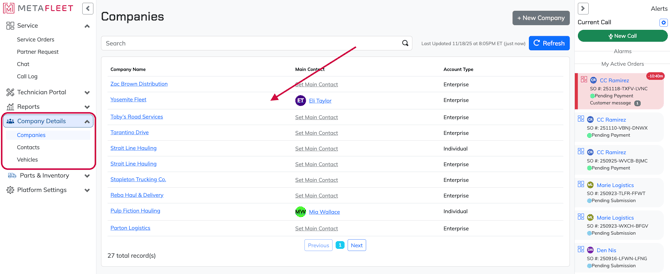
-
Select the company you want to exempt.
-
Open the Taxes tab.
-
Click Add New Tax Exemption.
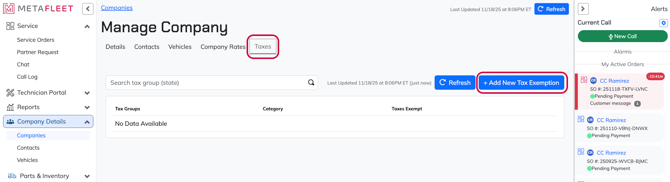
-
Choose from either:
• Entire Tax Group (exempts from all taxes in the group), or
• Specific taxes only (labor, parts, city, etc.)
-
Click Save. You'll now see how many exemptions from your selection apply to this customer.
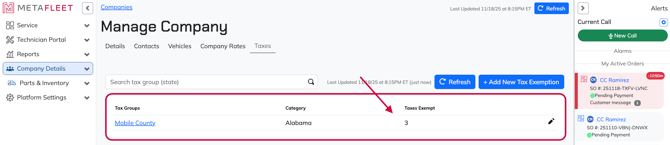
Tip: If you need exemptions for only some taxes, create separate tax groups so you can control exemptions more precisely.
Troubleshooting
| Symptom | Cause | Fix | Prevent |
|---|---|---|---|
| Customer still being taxed | Wrong group selected | Edit exemption and choose correct taxes | Verify group before saving |
| Only some taxes removed | Exempted only from one category | Add additional exemptions | Create multiple groups if needed |
| Exemption not applying | Invoice created before exemption | Void and recreate invoice | Set exemption before billing |
FAQs
Can I exempt only labor or only parts?
Yes. Exempt by tax type or by group.
Does exemption affect past invoices?
No. It only applies to new billing.
Can I remove an exemption later?
Yes—edit or delete the exemption any time.