
For: Managers · Permission: Manage service orders · Time: ~2 minutes
Who this is forManagers at shops that require a manager to vet estimates before they go out. This step only appears when Require Manager Approval for Estimates is on (see Configure Approval Options).
What you'll learnHow to find an estimate awaiting your review, approve it to send it onward, or reject it back to the dispatcher.
Before you start- You'll need: Manager-approval for estimates enabled, and an estimate a dispatcher has submitted for review.
- Where it is: The order's Estimate tab.
Quick summary
- Open the order's Estimate tab.
- Review the work items and total.
- Approve Estimate and Send Estimate to send it on, or Reject Estimate to bounce it back.
Open the estimate awaiting review.
On the order's Estimate tab, an estimate that needs your sign-off shows two buttons instead of the usual single Send — Approve Estimate and Send Estimate and Reject Estimate.
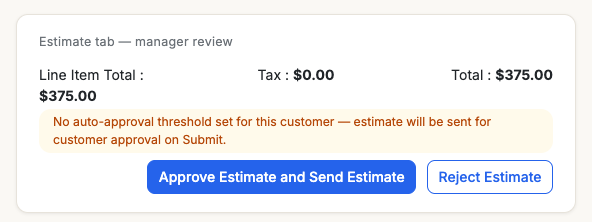
A manager's review controls — approve and send, or reject.
Review the work items and total.
Scroll the work items to check the labor, parts, fees, and the rolled-up total before you decide.
Approve — or reject.
Approve Estimate and Send Estimate moves it onward (to the customer for approval, or auto-approved under the customer's threshold). Reject Estimate sends it back to the dispatcher to revise.
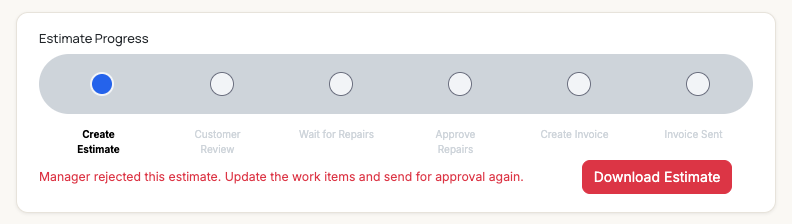
After a reject, the estimate returns to the dispatcher with a clear next step.
What happens after Approve? Approving clears the manager gate. Where it goes next depends on the customer gate: it's sent to the customer for approval, or auto-approves if it's under that customer's threshold. See Understanding the Approval Gates.After a rejection
The dispatcher sees "Manager rejected this estimate. Update the work items and send for approval again." They adjust the work items — labor, parts, pricing — and resubmit, which brings it back to you for another review.
Troubleshooting| Symptom | Likely cause | Fix |
|---|---|---|
| I only see "Send Estimate," not the review buttons | Manager approval for estimates is off | Turn it on under Account Details → Service Order Settings. |
| The estimate isn't waiting for me | The dispatcher hasn't submitted it yet | Have them build and submit the estimate first. |
| I rejected it — now what? | It's back with the dispatcher | They revise the work items and resend for your review. |
Does the customer see a rejected estimate?
No — a rejected estimate never leaves the shop. It goes back to the dispatcher to fix.
Does approving send it straight to the customer?
It clears your gate and sends it on — to the customer, unless it auto-approves under their threshold.
Can I edit the estimate myself instead of rejecting?
If you have dispatcher access you can adjust the work items directly; otherwise reject it back with the changes you want.