
Who this is for
Admins who configure regional tax structures.
What you’ll learn
• How to create Tax Categories
• When to use multiple categories
• How categories tie into Tax Groups
Before you start
• Know your tax jurisdictions
• Confirm tax names from your local tax authority
• Admin access required
Quick Summary (TL;DR)
• Go to Tax Categories
• Click New Category
• Enter name and description
• Save
Step-by-Step
-
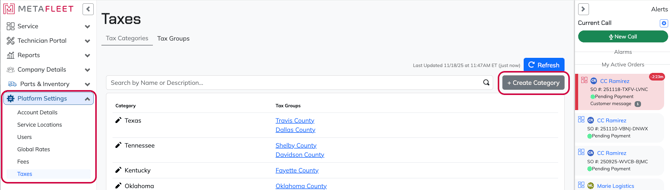
Navigate to Platform Settings → Taxes.
-
Click New Category.
-
Enter your category name.
Example:
• “State Tax – [Your State]”
-
Add a short description if needed.
-
Click Submit. (We recommend starting categories at the highest level [State, e.g.], because once you create categories, you can create the individual taxes as a part of your categories)
-
Repeat for each region you must report on.
Tip: If your tax reporting requires breaking out taxes by region, create separate categories instead of combining them.
Troubleshooting
| Symptom | Likely Cause | Fix | Prevent |
|---|---|---|---|
| Can't select a category in a Tax Group | Category wasn’t saved | Recreate the category | Wait for confirmation toast before leaving |
| Duplicate categories | Misnamed entries | Archive unused categories | Follow naming conventions |
| Unsure what categories to create | Not sure which regions apply | Check your local tax authority | Verify before building categories |
FAQs
How many categories can I create?
As many as needed—one per reporting region.
Do I enter tax rates here?
No. Categories only define regions. Rates are added later inside a Tax Group.
What if I operate in multiple cities?
Create one category per city.