
Field technicians tracking their hours — both the overall shift and the time spent on individual jobs.
What you'll learnHow to clock in and out for your shift, how a job's time tracks automatically while you work, and how to stop and resume that timer.
Quick summary
- Tap the shift clock on your dashboard to Clock In at the start of your day and Clock Out at the end.
- Each job tracks its own billable time while you work — the timer sits at the top of the order.
- Tap Stop Tracking to pause, Resume Work to pick back up. Time adds up across spans.
- If the timer's stopped and you start real work, the app offers to clock you back in first.
At the top of your dashboard is your shift clock. Tap it to Clock In when you start your day; while you're on, it shows Active and how long you've been clocked in. Tap Clock Out when you're done.

The shift clock on your dashboard — your overall on-the-clock status.
Per-job time trackingEach service order has its own billable timer. When you're working a job, the timer at the top of the order shows TRACKING TIME with a live count. That's the time that gets recorded against the job.
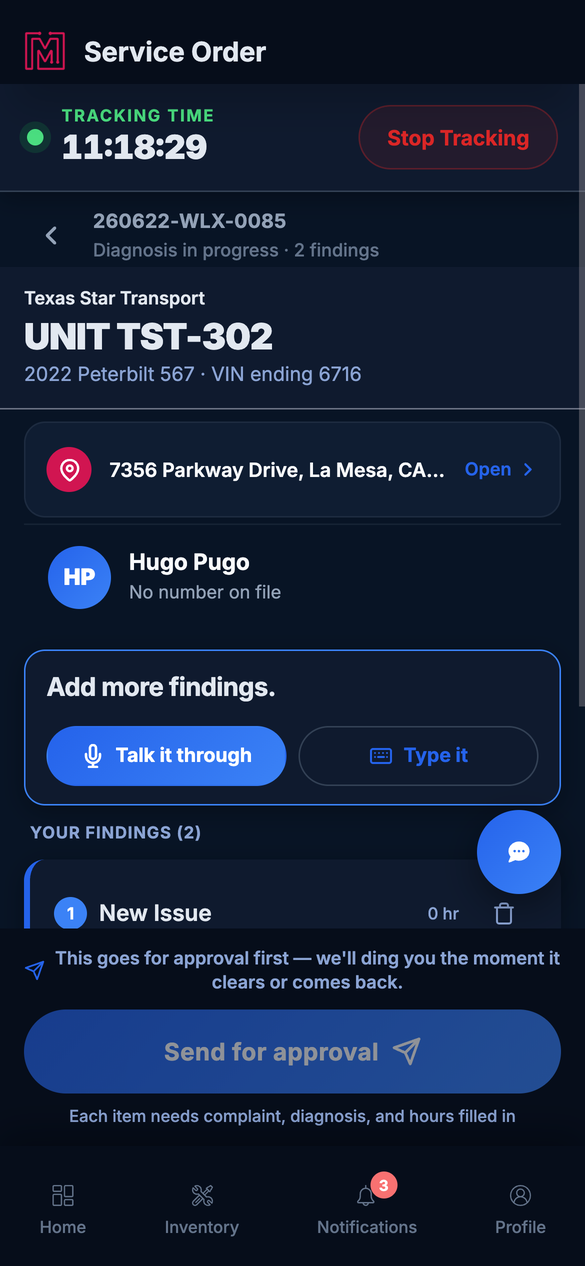
The job timer sits at the top of the service order while you work.
Stop & resume the job timerStepping away? Tap Stop Tracking.
A quick confirm shows the time for this span before you stop. Tap Stop Tracking to pause, or Keep Tracking to stay on the clock.
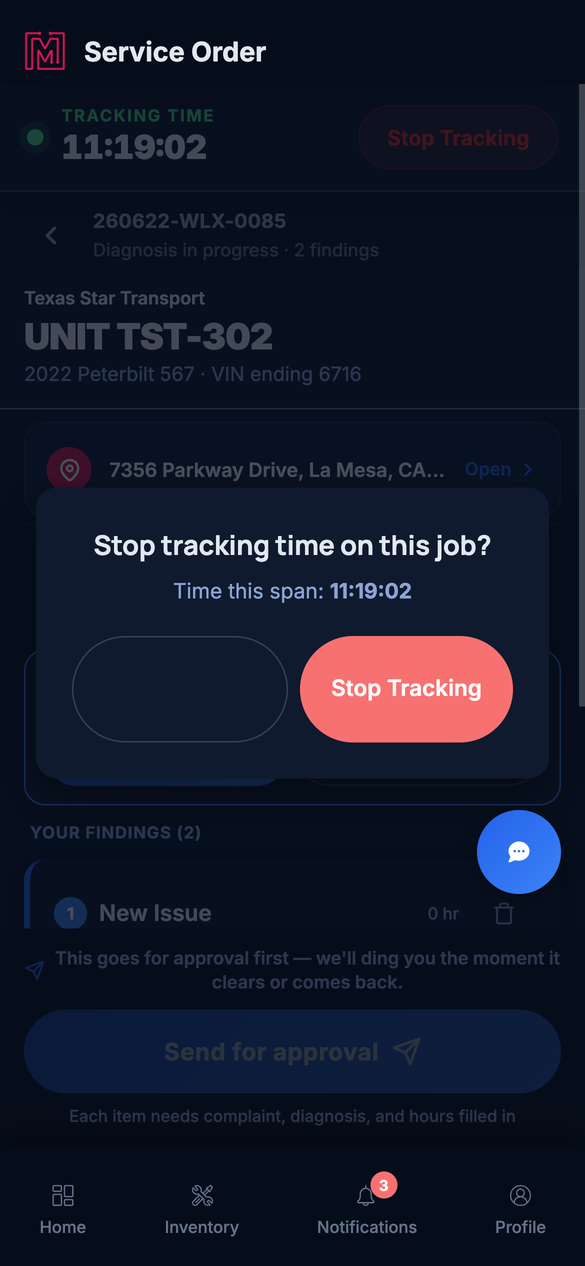
Stopping confirms the span so your billable time stays accurate.
Back on it? Tap Resume Work.
When the timer is paused, the chip offers Resume Work to start a new billable span. Your total for the job keeps adding up across spans.
Working after you stopped the timerIf you've stopped the job timer and then go to do real work on the order — add findings, type a finding, send for approval, submit repairs, edit a finding, or pick up a draft — the app first asks if you want to clock back in. This keeps that work from quietly happening off the clock.
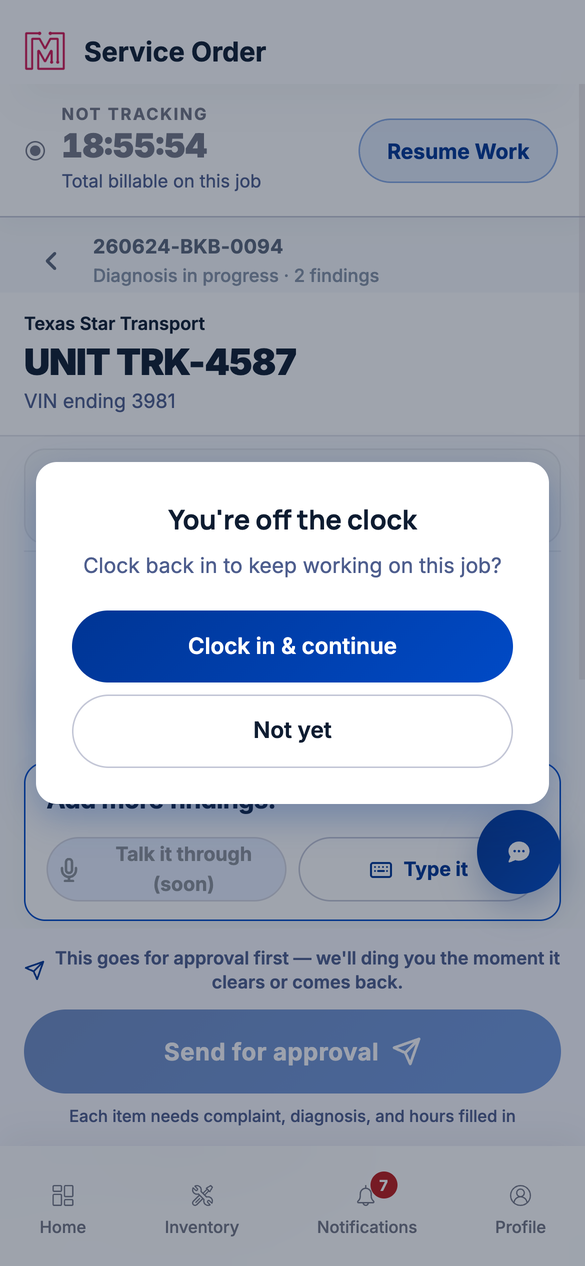
Tap a work action while the timer's off and the app offers to clock you back in first.
- Clock in & continue — restarts the job timer, then opens the action you tapped. Use this when you're back on the job.
- Not yet — skips the timer and runs the action off the clock. Use this when you're just tidying up and don't want to bill the time.
Shift vs. job. The shift clock says whether you're on duty today. The job timer says how much billable time you've put on this order. They're separate — clocking out for the day doesn't erase a job's recorded time.A note on the timer's color
- Green — Tracking time: the timer is running and counting.
- Grey — Not tracking: paused; tap Resume Work to start again.
- Amber — Still tracking time: a reminder that you're on the clock after submitting repairs — stop it when you're truly done.
| Symptom | Likely cause | Fix |
|---|---|---|
| I don't see the job timer on a job | The job isn't in a working state, or you're on desktop | The timer shows on mobile for active jobs. On desktop web you'll see a Clock Out control instead. |
| The amber "Still tracking time" won't go away | You're still on the clock after submitting repairs | Tap the chip and Stop Tracking when you've finished. |
| The app asks me to clock in every time I touch the job | The job timer is stopped, and you're starting work on the order | Tap Clock in & continue to restart the timer. The prompt stops once you're back on the clock. |
| My shift still says Active days later | You never clocked out | Tap the dashboard clock and Clock Out. |
Does the job timer start by itself?
It runs while you're actively working the job. You can pause it with Stop Tracking and pick back up with Resume Work.
Can I track time on two jobs at once?
Time is per job — stop one before you start putting billable time on another.
Does clocking out stop a job's timer?
They're separate. Stop the job timer on the order; clock out for your shift on the dashboard.
Why does it ask me to clock in when I start working?
If the job timer is stopped and you begin real work — adding findings, sending for approval, submitting repairs, or resuming a draft — the app checks whether you want to clock back in so the time gets recorded. Tap Clock in & continue to track it, or Not yet to proceed off the clock.
Where do my hours go?
A job's billable time is recorded on that service order and feeds the labor on its estimate and invoice.