---
title: Build Inspection Templates
description: "Build inspection items and templates in the Inspection Library: pick a type, add sections, preview the form and archive or restore a template."
---
[Skip to content](https://support.metafleet.ai/build-inspection-templates#main-content)
English
Show submenu for translations

Open main navigation
Close main navigation
- English
Show submenu for translations
- [Contact us](mailto:support@metafleet.ai)
[Contact us](mailto:support@metafleet.ai)
How can we help you?
- There are no suggestions because the search field is empty.
1. [MetaFleet Answer Hub](https://support.metafleet.ai/?hsLang=en)
2. [Dispatch & Scheduling](https://support.metafleet.ai/dispatch-scheduling?hsLang=en)
3. [Preventative Maintenance](https://support.metafleet.ai/dispatch-scheduling?hsLang=en#preventative-maintenance)
# Build Inspection Templates
## Build the inspection items and templates your technicians fill in, and start from a Global template when you don't want to build from scratch.
**For:** Owners, managers and dispatchers · **Permission:** Manage Inspections · **Time:** ~15 minutes for a first template
### Quick summary
1. Open **Settings › PM & Inspections › Inspection Library**.
2. On the **Items** tab, add any question your shop asks that isn't in the list yet.
3. On the **Templates** tab, click **+ New template**. Name it and set the inspection type under **Show form details & branding**.
4. Add sections, drop items into them and click **Preview**.
5. Click **Save**.
### Before you start
- You need the **Manage Inspections** permission.
- Items are the questions. Templates are the forms. A template is a list of sections, and each section holds items from your item list.
- Templates belong to the whole shop. The builder has no field for a service location, a customer or a vehicle type.
- To run an inspection from a finished template, see [Run an Inspection and Handle Follow-ups](https://support.metafleet.ai/run-an-inspection-and-follow-ups?hsLang=en).
### Open the Inspection Library
Go to **Settings › PM & Inspections** and click the **Inspection Library** tab. It has two tabs of its own: **Items** and **Templates**.
### Build your inspection items
Each row on the **Items** tab is one question, with its category, answer type and whether it's active. The **Scope** column shows **Yours** for items your shop made and **Global** for items MetaFleet provides. Use the search box, the **All / Global / Yours** buttons or the category list to find one.
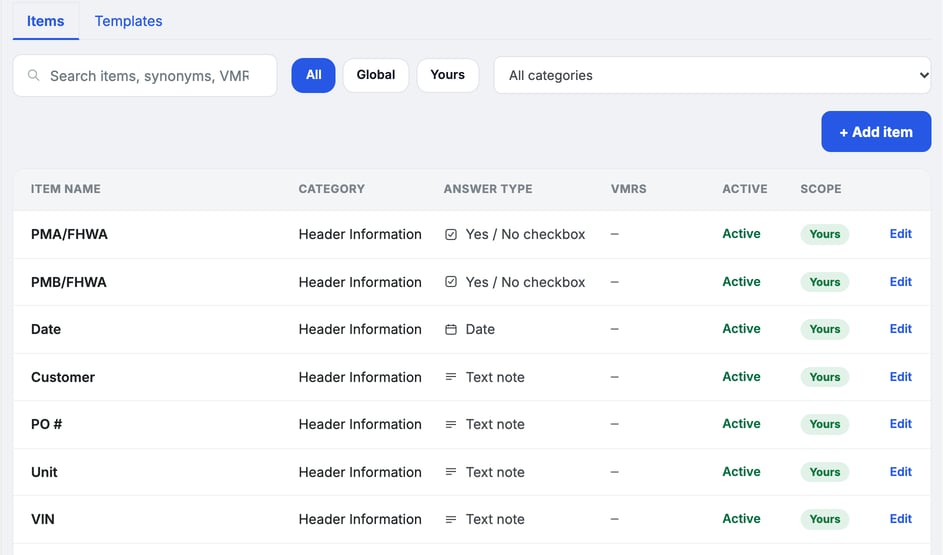
1. **Add an item.** Click **+ Add item**.
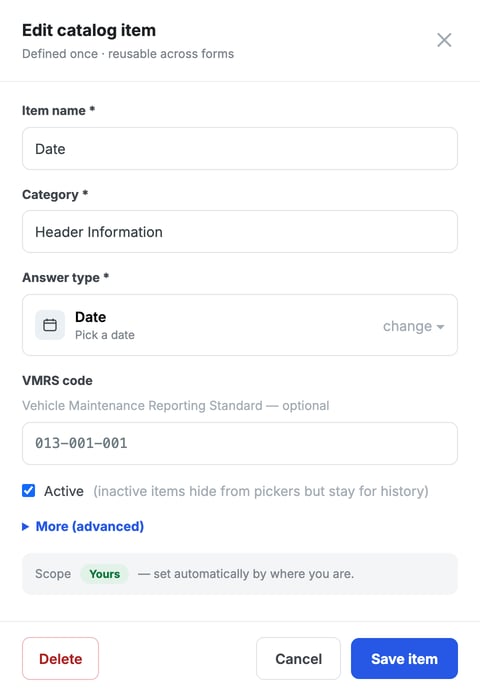
2. **Name it.** Fill in **Item name** and **Category**. Both are required.
3. **Choose how it's answered.** Click **change** next to **Answer type**. The types you'll see in the list include **Pass / Defect / N/A**, **Yes / No checkbox**, **Text note**, **Date** and **Measurement**.
4. **Add a VMRS code if you use one.** It's optional.
5. Click **Save item**.
To change an item, click its row or **Edit**. Clear **Active** to hide an item from the pickers. It stays on past inspections.
> **Global items are read-only.** You can use them in your templates but not edit them.
### Start a template
Click the **Templates** tab. Your shop's templates sit under **Your templates**. The ones MetaFleet provides sit under **Global templates**. Each card shows the type, the number of sections and items, and an **Official form** badge if a PDF is attached.
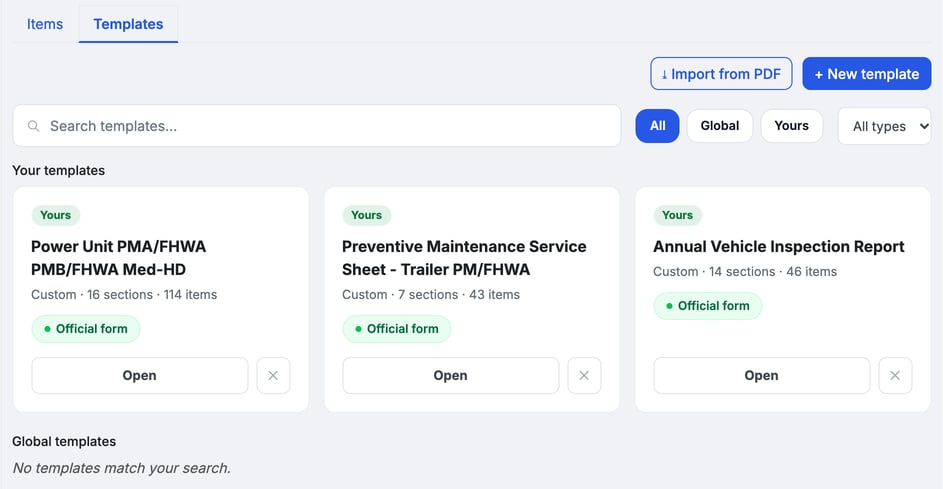
You have three ways to start:
- Click **+ New template** to build one from scratch.
- Copy a Global template and edit your copy. See "Use a Global template" below.
- Click **Import from PDF** and pick the form you use today. MetaFleet reads the questions and matches them to your items, and you review the result before it's built.
With no templates yet, the tab offers these same three choices.
### Set the template type and details
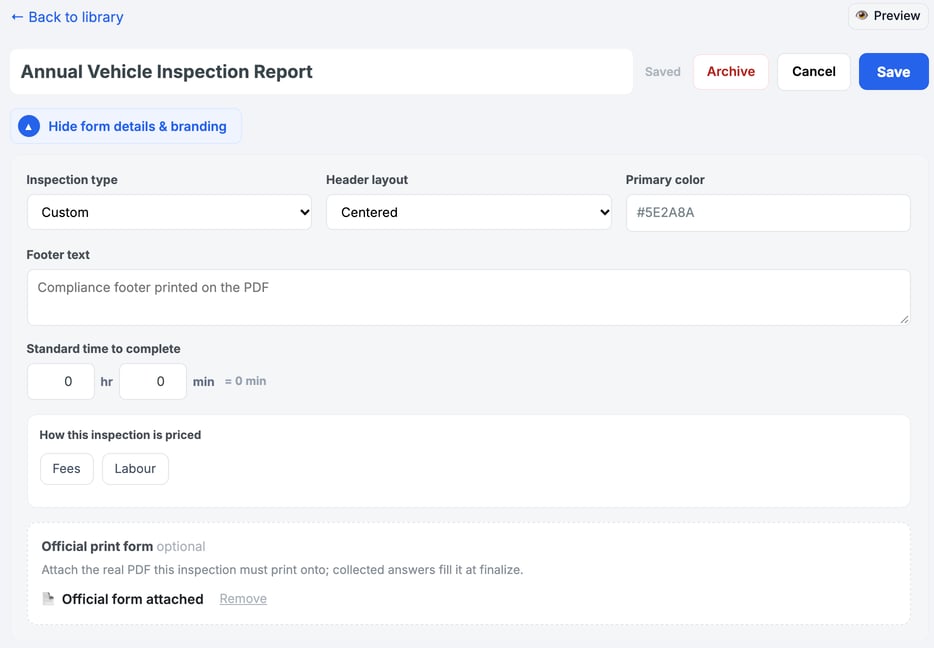
In the builder, type the template name at the top. Click **Show form details & branding** and set:
- **Inspection type:** **DVIR**, **PM (Preventive Maintenance)**, **Annual**, **BIT (90-day)** or **Custom**.
- **Header layout**, **Primary color** and **Footer text:** how the finished PDF looks.
- **Standard time to complete:** the hours and minutes you expect the inspection to take.
- **How this inspection is priced:** the **Fees** and **Labour** buttons.
- **Official print form:** attach the real PDF this inspection must print onto. The answers fill it in when the inspection is finalized.
### Add sections and items
1. **Add a section.** Click **+ Add section** and name it, for example "Brake System".
2. **Add items.** Search the item list on the left and click **+** next to an item to add it to the open section. **Placed** means the item is already in the template.
3. **Adjust each item.** Click the **Optional** toggle on an item to switch between optional and required, or use **Label override** to change the wording the customer sees.
4. **Reorder.** Use the up and down arrows on a section to move it.
### Preview the form
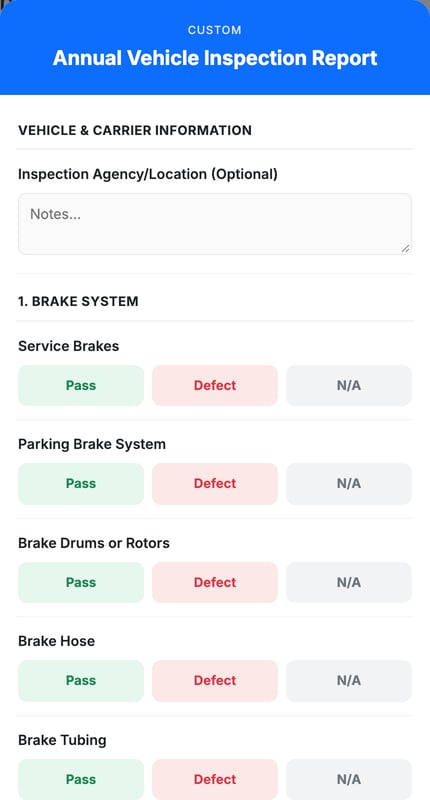
Click **Preview** at the top right. The **Technician preview** shows what the technician sees on the tablet, with the answer buttons for each item. Close it to keep editing.
### Save the template
Click **Save**. The label next to the name reads **Saved** when there is nothing left to save. Click **Cancel** to leave without saving, or **← Back to library** to return to the list.
### Use a Global template
Global templates are read-only. Click **View** on a Global card to look at the template. To change it, click **Clone to edit** to get your own copy under **Your templates**, then edit the copy.
### Archive a template and bring it back
Open the template and click **Archive**. MetaFleet asks "Archive this form?". Confirm with **Archive**. An archived template isn't offered on new inspections, and completed inspections keep it.
To bring one back, click **Archived (n)** at the top of the **Templates** tab (the button appears only when you have an archived template), open the template and click **Restore**.
### Troubleshooting
| Symptom | Likely cause | Fix |
| --- | --- | --- |
| I don't see the Inspection Library tab | Your role doesn't include Manage Inspections | Ask an admin to add the permission to your role. |
| I can't edit a Global item or template | Global items and templates are read-only | Click **Clone to edit** on the template and edit the copy. For an item, add your own. |
| A template is missing from a new inspection | It's archived | Restore it from **Archived (n)** on the **Templates** tab. |
| An item doesn't show in the picker | The item is cleared as inactive | Open the item and select **Active**. |
### FAQs
**Can I make a template for one service location?**
No. Templates apply to the whole shop. Name the template for the location (for example "DVIR - North Yard") if you want to tell them apart.
**Can I limit a template to one customer or vehicle type?**
Not from the Inspection Library. The builder has no field for either.
**Can I edit a Global template?**
No. Click **Clone to edit** and edit your copy.
### Related articles
- [Run an Inspection and Handle Follow-ups](https://support.metafleet.ai/run-an-inspection-and-follow-ups?hsLang=en)
- [Set Up Service Tasks and PM Programs](https://support.metafleet.ai/building-service-tasks-pm-programs?hsLang=en)
- [Book a PM, Inspection or Repair Appointment](https://support.metafleet.ai/scheduling-a-pm-appointment?hsLang=en)
- [Complete PM Work](https://support.metafleet.ai/complete-pm-work?hsLang=en)
- [Start Here](https://support.metafleet.ai/start-here?hsLang=en)
- [Companies & Contacts](https://support.metafleet.ai/companies-contacts?hsLang=en#main-content)
- [Create/Edit Companies](https://support.metafleet.ai/companies-contacts?hsLang=en#create-edit-companies)
- [Contacts](https://support.metafleet.ai/companies-contacts?hsLang=en#contacts)
- [Vehicles](https://support.metafleet.ai/companies-contacts?hsLang=en#vehicles)
- [Work Intake (Requests & Service Orders)](https://support.metafleet.ai/work-intake-requests-service-orders?hsLang=en#main-content)
- [Creating Service Orders](https://support.metafleet.ai/work-intake-requests-service-orders?hsLang=en#creating-service-orders)
- [Customer & Partner Requests](https://support.metafleet.ai/work-intake-requests-service-orders?hsLang=en#customer-partner-requests)
- [Reference](https://support.metafleet.ai/work-intake-requests-service-orders?hsLang=en#reference)
- [Customer Portal](https://support.metafleet.ai/work-intake-requests-service-orders?hsLang=en#customer-portal)
- [Estimates & Approvals](https://support.metafleet.ai/estimates-approvals?hsLang=en#main-content)
- [Approval Gates](https://support.metafleet.ai/estimates-approvals?hsLang=en#approval-gates)
- [Estimates](https://support.metafleet.ai/estimates-approvals?hsLang=en#estimates)
- [Invoices](https://support.metafleet.ai/estimates-approvals?hsLang=en#invoices)
- [Billing](https://support.metafleet.ai/estimates-approvals?hsLang=en#billing)
- [Parts, Inventory & Vendors](https://support.metafleet.ai/parts-inventory-vendors?hsLang=en#main-content)
- [Add Parts & Kits](https://support.metafleet.ai/parts-inventory-vendors?hsLang=en#add-parts-kits)
- [Stock & Counts](https://support.metafleet.ai/parts-inventory-vendors?hsLang=en#stock-counts)
- [Locations & Bins](https://support.metafleet.ai/parts-inventory-vendors?hsLang=en#locations-bins)
- [Purchase Orders](https://support.metafleet.ai/parts-inventory-vendors?hsLang=en#purchase-orders)
- [Parts Catalog](https://support.metafleet.ai/parts-inventory-vendors?hsLang=en#parts-catalog)
- [Vendors & Manufacturers](https://support.metafleet.ai/parts-inventory-vendors?hsLang=en#vendors-manufacturers)
- [Pricing](https://support.metafleet.ai/parts-inventory-vendors?hsLang=en#pricing)
- [Service Vehicles](https://support.metafleet.ai/parts-inventory-vendors?hsLang=en#service-vehicles)
- [Sourcing & Hand-Off](https://support.metafleet.ai/parts-inventory-vendors?hsLang=en#sourcing-hand-off)
- [Part Numbers](https://support.metafleet.ai/parts-inventory-vendors?hsLang=en#part-numbers)
- [Notifications](https://support.metafleet.ai/parts-inventory-vendors?hsLang=en#notifications)
- [Reports](https://support.metafleet.ai/parts-inventory-vendors?hsLang=en#reports)
- [Invoicing & Payments](https://support.metafleet.ai/invoicing-payments?hsLang=en)
- [Dispatch & Scheduling](https://support.metafleet.ai/dispatch-scheduling?hsLang=en#main-content)
- [Preventative Maintenance](https://support.metafleet.ai/dispatch-scheduling?hsLang=en#preventative-maintenance)
- [Technician Assignment](https://support.metafleet.ai/dispatch-scheduling?hsLang=en#technician-assignment)
- [Scheduling & Calendar](https://support.metafleet.ai/dispatch-scheduling?hsLang=en#scheduling-calendar)
- [Technician Schedule](https://support.metafleet.ai/dispatch-scheduling?hsLang=en#technician-schedule)
- [Technicians & Mobile App](https://support.metafleet.ai/technicians-mobile-app?hsLang=en#main-content)
- [Time Tracking](https://support.metafleet.ai/technicians-mobile-app?hsLang=en#time-tracking)
- [Tech Workflow](https://support.metafleet.ai/technicians-mobile-app?hsLang=en#tech-workflow)
- [Evidence & Photos](https://support.metafleet.ai/technicians-mobile-app?hsLang=en#evidence-photos)
- [AI Assistant](https://support.metafleet.ai/technicians-mobile-app?hsLang=en#ai-assistant)
- [Alerts, Alarms & Notifications](https://support.metafleet.ai/alerts-alarms-notifications?hsLang=en#main-content)
- [Email/SMS/App Settings](https://support.metafleet.ai/alerts-alarms-notifications?hsLang=en#email-sms-app-settings)
- [Reporting & Dashboards](https://support.metafleet.ai/reporting-dashboards?hsLang=en)
- [Admin & Settings](https://support.metafleet.ai/admin-settings?hsLang=en#main-content)
- [Rates & Fees](https://support.metafleet.ai/admin-settings?hsLang=en#rates-fees)
- [Branding](https://support.metafleet.ai/admin-settings?hsLang=en#branding)
- [Roles, Permissions & Users](https://support.metafleet.ai/admin-settings?hsLang=en#roles-permissions-users)
- [Service Areas](https://support.metafleet.ai/admin-settings?hsLang=en#service-areas)
- [Workflows](https://support.metafleet.ai/admin-settings?hsLang=en#workflows)
- [Taxes](https://support.metafleet.ai/admin-settings?hsLang=en#taxes)
- [Integrations](https://support.metafleet.ai/admin-settings?hsLang=en#integrations)
- [Integrations](https://support.metafleet.ai/integrations?hsLang=en#main-content)
- [Phone Setup](https://support.metafleet.ai/integrations?hsLang=en#phone-setup)
- [AI Assistant Access](https://support.metafleet.ai/integrations?hsLang=en#ai-assistant-access)
- [QuickBooks](https://support.metafleet.ai/integrations?hsLang=en#quickbooks)
- [Getting Around](https://support.metafleet.ai/getting-around?hsLang=en#main-content)
- [Search & Command Bar](https://support.metafleet.ai/getting-around?hsLang=en#search-command-bar)
[](http://www.metafleet.ai)
[mailto:support@metafleet.ai](mailto:support@metafleet.ai)
Copyright © 2025, MetaFleet, Inc