
For: Owners & Managers · Permission: Manage account settings · Time: ~2 minutes
Who this is forOwners and managers who want routine, low-dollar work to start without making the customer approve every estimate — while bigger jobs still go out for sign-off.
What you'll learnHow the threshold works, where to set it per customer, and how it interacts with the customer-approval gate.
How it worksThe threshold is a dollar amount set per customer. When you send an estimate:
- At or under the threshold → it auto-approves. The customer isn't asked, and work can start.
- Over the threshold → it's sent to the customer for approval as usual.
It rides on the customer gate. The threshold only does anything when Customer approval is required before work can begin is on. With that gate off, no estimate goes to customers at all, so the threshold has nothing to bypass — the card shows (paused).Before you start
- You'll need: The Customer approval gate turned on (see Configure Approval Options), and account-settings access.
- Where it lives: The customer's company page — not the global settings.
Quick summary
- Open the customer under Companies.
- On the Auto-Approval Threshold card, click Add auto-approval threshold (or Edit).
- Enter the dollar amount and Save.
Open the customer's company page.
Go to Companies and click the customer. Find the Auto-Approval Threshold card.
Enter a dollar amount.
Click Add auto-approval threshold (or Edit), type the limit, and click Save.
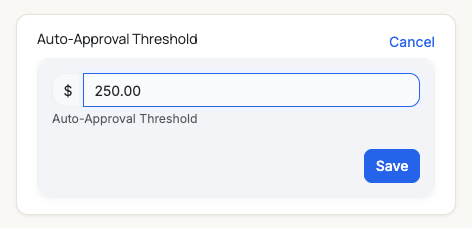
Set the limit for this customer — here, $250.
Confirm it's set.
The card now shows the active threshold. Estimates for this customer at or under it will auto-approve.
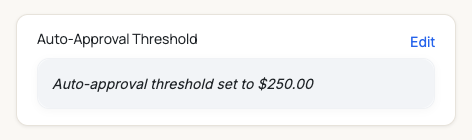
Set. From now on, estimates ≤ $250 for this customer skip the approval step.
See it before you send. On the dispatcher's Estimate tab, a hint shows whether the estimate will auto-approve or be sent to the customer — so there are no surprises. See Build & Send an Estimate.
Edit it up past the limit and it goes back for approval. If an estimate auto-approved under the threshold, then later edits push the total over it, MetaFleet automatically reverts it to needing customer approval — and records a note on the service order's history so you can see what happened. This keeps a small auto-approved job from being padded above the limit without the customer ever seeing it. (Once the job is in repair, the status is left alone — nothing changes under the technician's feet.)Troubleshooting
| Symptom | Likely cause | Fix |
|---|---|---|
| The card says "(paused)" and won't let me edit | The customer-approval gate is off | Turn on Customer approval in Service Order Settings — the card has a "Turn on customer approval" shortcut. |
| A small estimate still went to the customer | No threshold set for that customer, or it was over the limit | Set or raise the threshold on that customer's company page. |
| A big estimate auto-approved unexpectedly | The threshold is set higher than that job | Lower the threshold to the amount you're comfortable bypassing. |
| An auto-approved estimate now needs to be sent for approval again | Edits pushed the total over the customer's threshold, so it reverted to needing customer approval | This is expected. Send it to the customer, or trim the estimate back under the limit. Check the service order's history for the note explaining the change. |
Is the threshold global or per customer?
Per customer — set it on each company's page, so you can be more lenient with trusted accounts.
What about an estimate exactly at the threshold?
At-or-under auto-approves. An estimate equal to the limit is bypassed.
Does it skip manager approval too?
The threshold answers the customer question. If you also require manager approval for estimates, that step still applies.
Can I remove a threshold later?
Yes — edit the customer's card and clear it; estimates will go back to needing customer approval.
What if I edit an auto-approved estimate up past the limit?
It automatically goes back to needing customer approval, with a note on the service order's history. The customer always sees the final amount before work proceeds — an auto-approved job can't be quietly grown above the limit. Trimming the estimate back under the limit leaves the auto-approval in place. Once the job is in repair, the status is left as-is.