
Where it lives
Open a service order and go to the Chat tab. Alongside Customer, Internal, and Technical Support, there's an AI Assistant channel. It's on both the web and the mobile app.
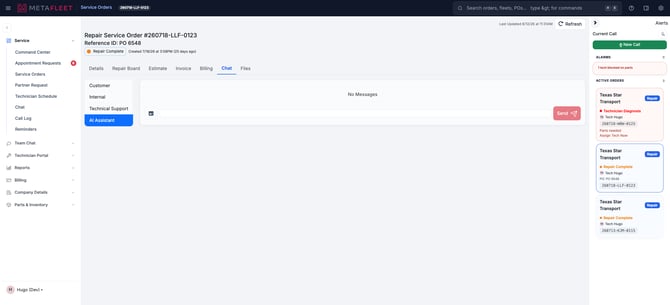 The AI Assistant channel on a service order — note the photo (image) icon in the composer.
- In the AI Assistant composer, tap the image icon and pick a photo (PNG, JPEG, or HEIC).
- Type your question — "what's leaking here?", "is this the right belt?", "what does this code mean?"
- Hit Send. The assistant reads the image and replies.
You can send one photo per message, and as many messages as you need — the assistant keeps the earlier photos in mind as the conversation goes.
It already knows the jobYou don't have to explain the truck. The assistant answers with the full context of that service order — the vehicle and asset type (so it knows a highway tractor from a piece of heavy equipment), the VIN, the complaint, the work items, and the parts on the order. That's why its answers are specific to this job, not generic.
TroubleshootingThese photos stay in the assistant. Pictures you send to the AI Assistant are for the conversation only — they do not show up in the service order's Files tab. Use the Files tab (photos/videos) for job evidence you want on the record.
| Symptom | Likely cause | Fix |
|---|---|---|
| Can't attach a photo | Wrong channel | Make sure you're on the AI Assistant channel — photo questions are answered there. |
| Photo won't send | Unsupported format or no connection | Use PNG/JPEG/HEIC and make sure you're online. |
| Only one image went through | It's one photo per message | Send another message with the next photo. |
| The photo isn't in Files | By design | AI Assistant photos are private to the chat; add a job photo on the Files tab if you want it on the record. |
What can I take a photo of?
Anything on the job — a leak, a worn part, a fault code, a nameplate or part number. The assistant reads the image and answers.
Does it understand the truck I'm on?
Yes — it uses the service order's vehicle, complaint, work items, and parts as context.
How many photos can I send?
One per message, as many messages as you like in the thread.
Do these photos become part of the record?
No — they stay in the AI Assistant conversation and don't appear in the Files tab.
Related articles:
- Enter the Complaint & Diagnosis
- Diagnostic Video on a Service Order
- Capture Vehicle Info Photos